Showing posts with label ASP.NET MVC 3. Show all posts

Thursday, February 16, 2012

Testing a Custom Filter Provider in ASP.NET MVC 3

There are many good articles published on how to write a custom Filter Provider in MVC 3 in order to make dependency injection possible on the web. So I'm not going to talk about that, but there doesn't seem to be many articles on how to test those custom filter providers.

The role of the filter provider is to simply return filters for a given controller, but this post assumes you know what a filter provider does so I'm going to skip the explaination. I've provided an MSDN link to the FilterProvider technical page for more information.

The FilterAttributeFilterProvider as provided by the ASP.NET MVC framework looks like the following: (I have the ASP.NET MVC source code on my machine, will show how to install and access this code in another post...)

    public class FilterAttributeFilterProvider : IFilterProvider 
    { 
        private readonly bool _cacheAttributeInstances; 

        public FilterAttributeFilterProvider() 
            : this(true) {
        }

        public FilterAttributeFilterProvider(bool cacheAttributeInstances) { 
            _cacheAttributeInstances = cacheAttributeInstances;
        } 
 
        protected virtual IEnumerable<filterattribute> GetActionAttributes(ControllerContext
                      controllerContext, ActionDescriptor actionDescriptor) {
            return actionDescriptor.GetFilterAttributes(_cacheAttributeInstances); 
        }

        protected virtual IEnumerable<filterattribute> GetControllerAttributes(ControllerContext
                     controllerContext, ActionDescriptor actionDescriptor) {
            return actionDescriptor.ControllerDescriptor.GetFilterAttributes(_cacheAttributeInstances); 
        }
 
        public virtual IEnumerable<filter> GetFilters(ControllerContext controllerContext,
                     ActionDescriptor actionDescriptor) { 
            ControllerBase controller = controllerContext.Controller;
            if (controller == null) { 
                return Enumerable.Empty<filter>();
            }

            var typeFilters = GetControllerAttributes(controllerContext, actionDescriptor) 
                             .Select(attr => new Filter(attr, FilterScope.Controller, null));
            var methodFilters = GetActionAttributes(controllerContext, actionDescriptor) 
                               .Select(attr => new Filter(attr, FilterScope.Action, null)); 

            return typeFilters.Concat(methodFilters).ToList(); 
        }
    }
It is the GetFilters method we are interested in as this is the method we override in our custom filter provider to provide things like dependency injection support.

So your custom filter provider might look something like the following (IoC container StructureMap specific):
   
    public class StructureMapFilterProvider : FilterAttributeFilterProvider
    {
        private readonly IContainer container;

        public StructureMapFilterProvider(IContainer container)
        {
            container = container;
        }

        public override IEnumerable<Filter> GetFilters(ControllerContext controllerContext,
                  ActionDescriptor actionDescriptor)
        {
            var filters = base.GetFilters(controllerContext, actionDescriptor);

            if (filters != null)
            {
                foreach (var filter in filters)
                {
                    container.BuildUp(filter.Instance);
                }

                return filters;
            }

            return default(IEnumerable<Filter>);
        }
    }

In the above filter provider, we are getting a list of filters for the passed controller context, and then calling BuildUp on those instances using StructureMap IoC container. This is a neat feature of StructureMap that allows you to support property injection without having to use decorators in the filter classes. If you'd like to learn more about StructureMaps BuildUp feature, please see this link: http://codebetter.com/jeremymiller/2009/01/16/quot-buildup-quot-existing-objects-with-structuremap/

You probably know already that ideally you'd want to call the base.GetFilters(ControllerContext, ActionDescriptor) to be on an interface so it can be easilly stubbed out in out unit tests, but it's not, its part of the superclass that we are deriving from.

So we are going to have to construct a ControllerContext and ActionDescriptor in order to pass into our filter provider during testing. All we are really aiming to test here is that the container BuildUp method is called against the filter instance. Your requirement might be slightly different depending on what you are trying to achieve and perhaps the IoC container you might or might not be using. But the principles should be the same.

Before I show how to test the above we need some supporting code. The first being a mocked controller that is decorated with a filter:

public class FilterProviderControllerMock : Controller
{
    [CustomErrorHandler]
    public void MockAction()
    {
    }
}

So here we simply have a controller with an action named MockAction that includes a custom action and does nothing. Notice how the action is decorated with a CustomErorHandler attribute - which is a custom filter. It's this attribute that we want to inject our dependencies into. I've not shown the code for this as it's not important, what is important is to realise that this filter has dependencies that cannot be injected via the constructor due to limitations in .NET (i.e. it being an attribute).

First consider the actual test code (note: I'm using Moq as my mocking tool of choice - just because it's a change to Rhino):

[TestFixture]
public class StructureMapFilterProviderTests
{
     private Mock<IContainer> containerMock;
     private StructureMapFilterProvider filterProvider;
     private Filter customFilter;
     private List<Filter> customFilterCollection;
     private CustomErrorHandlerAttribute customActionFilter;
     private Mock<HttpContextBase> httpContextMock;

     [TestFixtureSetUp]
     public void Setup()
     {
         customActionFilter = new CustomErrorHandlerAttribute();
         customFilter = new Filter(customActionFilter, FilterScope.Action, 1);
         customFilterCollection = new List<filter>();
         customFilterCollection.Add(customFilter);
         containerMock = new Mock();
         filterProvider = new StructureMapFilterProvider(this.containerMock.Object);
         httpContextMock = new Mock<HttpContextBase>();
     }

     [Test]
     public void CanInterceptCreationOfFilters()
     {
         // Arrange
         containerMock.Setup(x => x.BuildUp(customActionFilter));
          
         var controllerMock = new FilterProviderControllerMock();
         var routeData = new RouteData();

         var controllerContext = new ControllerContext(this.httpContextMock.Object, routeData, controllerMock);

         ControllerDescriptor controllerDescriptor = new 
                     ReflectedControllerDescriptor(typeof(FilterProviderControllerMock));

         var mockActionMethodInfo = controllerMock.GetType()
             .GetMethods(BindingFlags.Public | BindingFlags.Instance)
             .Where(x => x.Name.Equals("MockAction")).FirstOrDefault();
         ActionDescriptor actionDescriptor = new 
                 ReflectedActionDescriptor(mockActionMethodInfo, "MockAction", controllerDescriptor);
       
         // Act
         var filters = filterProvider.GetFilters(controllerContext, actionDescriptor);

         // Assert
         containerMock.Verify(x => x.BuildUp(this.customActionFilter), Times.Once());
    }
}
So what's going on here, there seems to be a lot of code. There is because the superclass filter provider is hard to test due to how it was designed (using inheritance). So the test above is simply creating a ControllerContext and an ActionDescriptor which is required in order to call the filter provider. Doing these things requires a bit of .NET reflection that would normally be done by the MVC framework at runtime. Once reflection has been used and the correct action method has been identified, the provider can easily select the correct filter then our custom filter can build it up (inject all required dependencies into the filter). We then finally assert that the build up happens on our custom filter at least once otherwise the test will fail.

I'm sure in later releases of ASP.NET MVC this will improve, but for now this is a work around to test your custom filter providers.

This sample code is up on BitBucket here if you want it: http://code.simonrhart.com/mvc-3-examples/src/5b122b445c86/Testing%20StructureMap%20Filter%20Provider

Enjoy!

Friday, November 11, 2011

Code formatter for blogs

I came across this site that allows for easy formatting of source code for displaying on blog posts. Pretty cool. This is a test post...
   public class StructureMapFilterProvider : FilterAttributeFilterProvider  
   {  
     /// <summary>  
     /// Structuremap instance.  
     /// </summary>  
     private readonly IContainer container;  
     /// <summary>  
     /// Initializes a new instance of the <see cref="StructureMapFilterProvider"/> class.  
     /// </summary>  
     /// <param name="container">The container.</param>  
     public StructureMapFilterProvider(IContainer container)  
     {  
       this.container = container;  
     }  
     /// <summary>  
     /// Intercept's GetFilters, then use the "BuildUp" feature of structuremap to avoid using decorators for property injection and this  
     /// involves coupling.  
     /// </summary>  
     /// <param name="controllerContext">The controller context.</param>  
     /// <param name="actionDescriptor">The action descriptor.</param>  
     /// <returns>A list of filters for the current context.</returns>  
     public override IEnumerable<Filter> GetFilters(ControllerContext controllerContext, ActionDescriptor actionDescriptor)  
     {  
       var filters = base.GetFilters(controllerContext, actionDescriptor);  
       if (filters != null)  
       {  
         foreach (var filter in filters)  
         {  
           this.container.BuildUp(filter.Instance);  
         }  
         return filters;  
       }  
       return default(IEnumerable<Filter>);  
     }  
   }  
Neat, I like it!

Saturday, September 24, 2011

ReSharper 6 now supports ASP.NET MVC 3


I'd like to say to a big thanks to the chaps over at JetBrains for once again giving me a free NFR (Not for resale) copy of ReSharper 6.

If you have never heard of ReSharper or not quite sure what it is, I have written about this Visual Studio plugin multiple times in the past. here, here and here.

There are quite a few new features in this latest release. Most of which are around support for ASP.NET MVC 3 and the new Razor view engine.

This blog post assumes you know ASP.NET MVC 3 fairly well. If not check out Microsoft's ASP.NET MVC 3 tutorials. I'd start here: http://www.asp.net/mvc/mvc3


Razor view to controller navigation

So in the previous version of ReSharper which is v5.1, there was little support for the integration between Razor (views) and the Controllers. This was because ReSharper 5.1 was released before MVC 3 shipped. Also, by default, there is no validation provided by the MVC 3 developer tools. So if you happen to write a piece of HTML Razor markup like so:

@Html.ActionLink("Register", "Register2")

The above code will execute action method Register2 on the Controller that the view was generated from. In this case the controller is the Account controller as this is the default application I am testing ReSharper on that gets generated from the T4 VS template for an MVC application. The above code will compile and run. You won't actually know that the above markup is in error until you actually run the application and browse that actual page. There is no tool support in Visual Studio that will tell you that this will error.

When running the application with the above markup, the following error is returned in Figure 1 below:

Figure 1: Error when attempting to execute an invalid action from a Razor view

In ReSharper 6 the above issue is prevented, not completely though. I'll show that in a minute.

The next thing is within a Razor view, in order to understand the location or path of an action, you have to understand how the application has been implemented unless of course the name of the Controller has been specified within the call. In the above markup example, it hadn't, it's inferred at run time. So take the following markup again:

@Html.ActionLink("Register", "Register2")

The above markup requires you to know how the view was generated, from which controller. that piece of HTML is actually from the LogOn.cshtml partial. Wouldn't it be neat if you could just click the Register2 action in order to navigate to it?

Installing ReSharper 6 allows you to do just that which I'll show in just a few moments...

Controller to view navigation

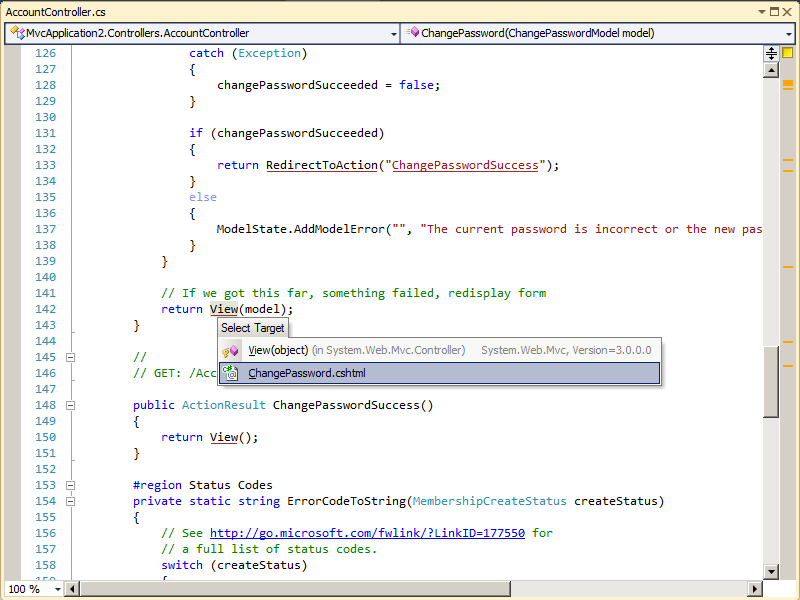
With ReSharper 5.1 there was a little support for finding Views from Controller actions. For example take the following example from the AccountController in the MVC 3 sample application:

Figure 2: Searching for the view from a Controller using ReSharper 5.1

Here we can resolve the view and navigate to it, which is great, but I'd really like to know the path of the view in some cases.

Now after ReSharper 6.0 is installed (compatible with VS 2010) lets look at some of the above issues we had before.

One thing you will notice when upgrading to ReSharper 6.0 from either 5.0 or 5.1, is you need a new licence key. ReSharper 5.x licence keys do not work for ReSharper 6.0:

Figure 3: ReSharper 6.0 requires a new licence key (I did blank out my 5.1 key, sorry!)


Razor view to controller navigation (RS 6.0)

So now if we open up the LogOn.cshtml file as before and take a look at some of the Razor markup for Controller navigation, we get the following:

Figure 4: New support in Razor for Controller action resolution
So now I have the familiar ReSharper support for just navigating to a method from a calling piece of code. It just so happens here that ReSharper understands the routes setup within an MVC application.

Also notice in this version of ReSharper the familiar "type" box, whether you get this via CTRL + Click or CTRL + T, now shows you the actual project the type lives. This is another powerful feature if the namespaces do not match up to assemblies.

You can get the above menu displayed simply by pressing CTRL + then click the action.

Pressing those key combinations displays a list of methods that match the action name for the controller that generated the view. To navigate to a given action, simply click the desired one in the pop up list, ReSharper will then open that source code and place your cursor at that method.

Notice the above action name is underlined. ReSharper uses this notation to signify that the action or type has been resolved successfuly. This is new when it comes to string types as the action name passed to the Html class is actually a string.

So as before if we now mistype an action that doesn't exist anywhere, ReSharper kindly lets us know there is an issue:

Figure 4: ReSharper 6.0 tells us when the action cannot be resolved!

I really like the above feature. It can save you time. Also notice as the above error gets marked on the right side of the source window above, this is a standard ReSharper feature. Because it's been marked red, it means it's an error.

Although the code will compile and run as before, ReSharper is doing it's best to let you know there is a problem and should be fixed.

Controller to view navigation (RS 6.0)

As we looked earlier, there is a bit of support for Controller to view navigation in ReSharper 5.1, but it gets better in ReSharper 6.0.

So now in version 6.0, placing the mouse cursor over the call to the View method within the controllers (or which ever base controller method is being called) no longer displays the overloads as it did before, instead you get a tool tip that gives you the physical location of the view. In this case we are using Razor so it is the .cshtml file:

Figure 5: In ReSharper 6.0, you can see the physical location of the actual view file from the controllers

I really like the above feature, it just means you have to think less!

There are more features to ReSharper 6.0 but the above ones are the ones I thought were the best, enjoy!

You can download a free 30-day trial of ReSharper 6.0 for Visual Studio 2010 from here: http://www.jetbrains.com/resharper/