Friday, March 14, 2008

Device Unit Testing using Visual Studio 2008 Team System

With the release of Visual Studio 2008 device unit testing or in fact desktop unit testing is now built into the IDE which makes unit testing alot easier than before. Note device unit testing is only supported on Visual Studio Team System 2008 with Test Edition or Team Suite. See here for a Visual Studio product comparison.

If you would like to learn more about what agile unit testing is see here.

With Visual Studio 2005 there were tools such as Test Driven.net, NUnit, MBUnit typically were used and still are today, in fact we still use NUnit mainly because we like it, it works and we have hundreds of tests written using it. There are differences with the above tools, we chose NUnit because it was ported from JUnit which worked also.

This article will cover how to use unit testing on a Windows Mobile device and show how simple it is. In fact I am very fond of it as it does in fact do alot of work for you that NUnit doesn't. Also the difference with the VS unit testing over NUnit is that in VS the unit testing is integrated in the IDE.

There are two ways to create unit tests in VS 2008, one is to create tests from production code or to create them by hand. Of course it is less work to create the tests from production code so this is what I'll talk about in this article.

1. Start off with a simple device class library. In this example I have created a simple calculator which adds two numbers together. The code looks like the following:
namespace Calculator
{
public class SimpleCalculator
{
public decimal Add(decimal num1, decimal num2)
{
return num1 + num2;
}
}
}
As you can see, it is very simple.

2. Right click the source for which you would like to create the test project, then select "Create Unit Tests..." option.


3. Select the method for which you would like to create the test.


4. Clicking on "Settings..." button will allow you to configure how the unit test wizard will create your test.

Most of the options are self explanatory. I always change the name to the name of the class coupled with "Fixture" ie in this case "SimpleCalculatorFixture". It stems from NUnit days.

The only option that needs to be clarified below is the "Mark all test results Inconclusive by default". This option forces the test to fail when run because it is not implemented. Of course it is good practice to honor this setting.


5. Clicking OK to the Test Generation Settings dialog then click OK again on the Create Unit Tests dialog will prompt you to enter a name for your new test project, enter a name and click OK.

6. After completing the above Visual Studio creates the test project and some test methods. quite neat when you think in the past you'd have to do all this yourself.

In the above example the test code VS generated looks like the following:
using Calculator;
using Microsoft.VisualStudio.TestTools.UnitTesting;
using System;

namespace CalculatorTest
{

[TestClass()]
public class SimpleCalculatorTest
{
private TestContext testContextInstance;

public TestContext TestContext
{
get
{
return testContextInstance;
}
set
{
testContextInstance = value;
}
}

#region Additional test attributes
//
//You can use the following additional attributes as you write your tests:
//
//Use ClassInitialize to run code before running the first test in the class
//[ClassInitialize()]
//public static void MyClassInitialize(TestContext testContext)
//{
//}
//
//Use ClassCleanup to run code after all tests in a class have run
//[ClassCleanup()]
//public static void MyClassCleanup()
//{
//}
//
//Use TestInitialize to run code before running each test
//[TestInitialize()]
//public void MyTestInitialize()
//{
//}
//
//Use TestCleanup to run code after each test has run
//[TestCleanup()]
//public void MyTestCleanup()
//{
//}
//
#endregion


///
///A test for Add
///

[TestMethod()]
public void AddTest()
{
SimpleCalculator target = new SimpleCalculator();
Decimal num1 = new Decimal();
Decimal num2 = new Decimal();
Decimal expected = new Decimal();
Decimal actual;
actual = target.Add(num1, num2);
Assert.AreEqual(expected, actual);
Assert.Inconclusive("Verify the correctness of this test method.");
}
}
}

As you can see from the above test code, it is very similar to how things are done using NUnit. Notice the similar attributes used to mark methods. The most notable one being the TestClass attribute the NUnit equivilent is TestFixture. These attributes and all testing methods etc can be found in a simple assembly named: Microsoft.VisualStudio.TestTools.UnitTesting.dll. You don't need to add this to your test project because Visual Studio has already done this for you. It doesn't get any easier than this!!

Many of the methods VS has added for us such as MyClassInitialize, MyClassCleanup etc are commented out they have been added for ease of implementation if required.

7. Now we have everything in place, lets see what happens when we run the test, bearing in mind we haven't written any tests yet, we have simply let VS do its job and create a test project for us.
/// 
///A test for Add
///

[TestMethod()]
public void AddTest()
{
SimpleCalculator target = new SimpleCalculator();
Decimal num1 = new Decimal();
Decimal num2 = new Decimal();
Decimal expected = new Decimal();
Decimal actual;
actual = target.Add(num1, num2);
Assert.AreEqual(expected, actual);
Assert.Inconclusive("Verify the correctness of this test method.");
}
Now running the test will execute the above, of course the line Assert.AreEqual will fail because we have already written our production code which adds the two numbers together so the result of this method call will not be equal. Visual Studio has guessed here what the likely result might be, clever but not quite clever enough!

So running the above test results in failure on my machine. I am attemping to run the test on an emulator. The error message I am getting is:

The test adapter ('Microsoft.VisualStudio.TestTools.TestTypes.Unit.UnitTestAdapter, Microsoft.VisualStudio.QualityTools.Tips.UnitTest.Adapter, Version=9.0.0.0, Culture=neutral, PublicKeyToken=b03f5f7f11d50a3a') required to execute this test could not be loaded. Check that the test adapter is installed properly. Exception of type 'Microsoft.VisualStudio.SmartDevice.TestHostAdapter.DeviceAgent.NetCFNotInstalledException' was thrown.
I wrote a blog regarding this error a while back here.

This basically means .NET CF 3.5 is not installed and VS doesn't deploy .NET CF 3.5 before executing the test if required even though the option under the test project properties Devices tab "Deploy the latest version of the .NET Compact Framework (including service packs)" is set.


You can simply deploy a Windows Forms application with the above option set and VS will deploy CF 3.5 just as it's always done, if you don't have a Windows Forms application, deploy the CAB file to the device/emulator manually then run it. After this the tests should execute.

8. Now I have fixed the above problem, lets try running the test again. This time I get the following results in the new Test Results window.


From the above Test Results window it is difficult to read the error as to why the test failed. Double clicking the error row loads the properties window for this particular test which gives us some more information as to why the test failed.


9. As we can see from the error message above the Asset.Inconclusive failed. If you remember when VS creates a test template, it inserts the Assert.Inconclusive which will fail when run. So to fix this problem, we simply change the test to the following:
        /// 
///A test for Add
///

[TestMethod()]
public void AddTest()
{
SimpleCalculator target = new SimpleCalculator();
Decimal num1 = new Decimal();
Decimal num2 = new Decimal();
Decimal expected = new Decimal();
Decimal actual;
actual = target.Add(num1, num2);
Assert.AreEqual(expected, actual);
}
We have simply removed the call to the static method Inconclusive.

Now if we run the above test we get the following:
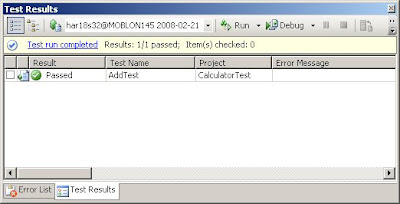


Suprisingly, the test passes. It's not really that suprising because if you look at the AddTest method above, you'll notice that VS has created an instance of two decimal objects which both will be 0 and declared a returning type which isn't instanciated, but the AddTest method creates it and passes it back to the test method. So we are performing this calculation: 0 + 0. Of course the result will be 0 which is why the test passes.

Explore the Assert class, there are many methods to use against your tests much like NUnit. It seems the Testing framework in VS 2008 was built on NUnit and I like it alot!

Friday, March 07, 2008

Adding a block of XML to an existing XmlDocument object

Sometimes you have the need to add a block of XML (string) to an existing XmlDocument (DOM object).

Luckily you don't have to create nodes then import them etc, instead the class XmlDocumentFragment comes to our rescue which allows us to write much cleaner code in this senario - and we all love clean code!

Take the following peice of XML file named myXml.xml:
<Sys>
<Header\>
<Body\>
</Sys>
Now take the following code:
XmlDocument doc = new XmlDocument();
doc.Load("myXml.xml");

Now take the following XML block:
<Start id="7672-2322-2322-3324"/>
Now what if I wanted to add the above block of XML into the Body element of the doc XmlDocument object but I didn't have control over the schema -or maybe I don't care what the schema looks like or don't even know what it looks like, all I want to do is insert it into the body. I could use the CreateNode() method, but this is ugly and I have to know the schema, also this would add a maintance overhead as everytime the schema is changed, I'd have to change my code too.

Instead the XmlDocumentFragment class can be used. Take the following code:
XmlDocument doc = new XmlDocument();
string s = "<Start id="7672-2322-2322-3324"/>";
doc.Load("myXml.xml");
XmlDocumentFragment fragment = doc.CreateDocumentFragment();
fragment.InnerXml = s;
//Use GetElementsByTagName instead of XPath incase the schema changes.
XmlNodeList body = doc.GetElementsByTagName("Body");
if (body.Count > 0)
body[0].AppendChild(fragment);
That is all there is too it. The output of the above will now look like the following:
<Sys>
<Header\>
<Body>
<Start id="7672-2322-2322-3324"/>
</Body>
</Sys>

Thursday, February 28, 2008

Visual Studio Gallery

The Microsoft Visual Studio Ecosystem team recently announced the Visual Studio Gallery web site: http://visualstudiogallery.com/.

This web site is a central respository for Visual Studio extensions. It is possible for developers to add their own Visual Studio extensions to this site for others to access. The site however doesn't host the extensions, the site contains web links to where they can be found and information about the extension.

Wednesday, February 13, 2008

Upgrading your device solutions to Visual Studio 2008 and the .NET CF 3.5

As the title says upgrading your pre 2008 device solutions to Visual Studio 2008 and to run under the .NET CF 3.5 is a two step process. This is because Visual Studio 2008 supports multi-targeting.

By default when you upgrade your VS 2005 projects to VS 2008 they continue to target the .NET Framework 2.0. This is true for both desktop and devices. This article quickly talks about how you target the new frameworks after conversion.

1. Open your VS 2005 solution in VS 2008. The conversion wizard will load, simply run though this.


2. This particular solution contains device projects as well as desktop projects.

3. As you can see, after the project has been converted, it is still compiled against the CF 2.0.


4. In VS 2008 there is a new menu option labeled "Upgrade Project" (among others) under Project or the same option can be accessed under the context menu by right clicking the project.

NOTE: This new option is only visible to device applications.

Clicking it will upgrade your Compact Framework 2.0 application to compile against the Compact Framework 3.5.


5. Clicking the "Upgrade Project" menu option will prompt you to continue.


Once you have clicked Yes, the process is very quick and does indeed upgrade your device application to compile against the CF 3.5.


6. After doing the above you will notice the "Upgrade Project" menu option will disapear from the project context and main menus.


Although this post is mainly about devices I thought I'd mention converting your desktop applications from .NET Framework 2.0 to .NET Framework 3.5 is slightly different. There is no "Upgrade Project" menu option for desktop projects, instead you have to use the muli-targeting support features under project properties to target the .NET Framework 3.5.

Sunday, February 03, 2008

NETCFv35.Messages is the new System_SR

In Visual Studio 2008 and the .NET Compact Framework 3.5, NETCF35.Messages replaces the System_SR found in previous versions of the CF.

So if you had the message similar to the following running pre CF 3.5 when a framework exception occured: "An error message cannot be displayed because an optional resource assembly containing it cannot be found". A solution to this was to install System_SR_ENU_wm.cab (if running Windows Mobile) or System_SR_ENU.cab (if running Windows CE). Both of which ships with the Windows Mobile SDK's. Doing this only worked if you were lucky! not really, there is some science to it, science that I am not sure of. A combination of installing the CF and combination of localized apps on the device

In Visual Studio 2008, this new cab that replaces System_SR is named: (NETCFv35.Messages.ENU.wm.cab for Windows Mobile or NETCFv35.Messages.ENU.cab for Windows CE) is not installed by VS initially when you start debugging whereas in pre VS 2008 we enjoyed the automatic install on debugging for the first time. You have to install this CAB explicitly. This cab can be found here: C:\Program Files\Microsoft.NET\SDK\CompactFramework\v3.5\WindowsCE\Diagnostics - of course assuming C: is where you decided to install the CF.

Friday, February 01, 2008

MVP Summit 2008

I'll be attending the MVP Summit April 2008 in Redmond. Anyone else coming!!??

Tuesday, January 29, 2008

MEDC 2008

I recently wrote a blog regarding the coming TechEd 2008 in Orlando FL containing a Windows Mobile track and that there will no longer be a MEDC (Mobile & Embedded DevCon) event in the U.S nor in any other location worldwide. The reason is because Windows Mobile technology are now considered mainstream solutions - Microsoft confirmed today.

In the past, the Windows Embedded and Windows Mobile organizations have hosted separate and joint events.

This news is offical that I heard from Microsoft clarified today - just to put any questions to bed ;)

This is a good thing as it makes the TechEd from this date forward even bigger and now mobile devices are becoming more mainstream is good news for all involved in mobile technology.

Sunday, January 27, 2008

TechEd Developers 3 - 6 June 2008

I will be speaking at the coming TechEd 2008 hosted in Orlando FL, USA June 3 - 6 2008. I will be doing a series of hands-on-labs covering various common mobility challenges in the enterprise seen today using all the latest technologies. Namely; VS 2008, SQL Server 2008, SQL Server CE 3.5, C# 3.0, Windows Mobile 6 and .NET Compact Framework 3.5.

As I mentioned in an earlier post MEDC will be replaced with the TechEd Developers conference which now includes a mobility track (among others of course).

There will be over 145 hand-on-labs sessions, over 340 breakout sessions, more than 220 interactive theaters and 16 technical tracks which are as follows:

Architecture
Business Intelligence
Database Platform
Developer Tools and Languages
Development Practices
Dynamics
Infrastructure for Developers
Microsoft IT
Office and SharePoint
SOA and Business Processes
Software Plus Services
Unified Communications
Web and User Experience
Windows and Frameworks
Windows Embedded
Windows Mobile

See here for more information.

Developer UK Launch –Visual Studio 2008, SQL Server 2008, Windows Server 2008

I have been asked by Microsoft to help out on the Ask the Experts panel for the Developer UK Launch conference held at the ICC in Birmingham on the 19th March 2008 - an all day event.

I will be helping out with the Visual Studio 2008 team, so if you are attending be sure to ask not just mobility questions but any VS related questions.

It seems this event is now full but it is possible to put your name on the waiting list by calling: 0870 166 6640. See here for more info.

Sunday, December 30, 2007

XBOX 360: Upgrading to XBOX Live Gold Membership

I recently bought an XBOX 360 Live Gold Membership so I could upgrade my Silver membership to Gold for additional benefits you get.

I bought a pre-paid ticket from Game and the idea is you simply scratch off the back and enter the code and it upgrades your XBOX Live account. After I tried this via the XBOX I received an error code (can't remember the number - should have made a note of it). So before phoning customer support, I tried again but this time via http://www.xbox.com using my laptop but received a different error, something along the lines of "the code was invalid or not for this web site...." After phoning support, support knew straight away it was because I didn't set my address, email and phone number in my profile! After setting this information, it worked a charm.Very good support I may add, would of been useful for a more meaningful error message though or validation.

So if you decide to upgrade your XBOX Live Silver account to Gold in the near future, remember to set your address, email and telephone number in your profile!

What's new for device developers in Visual Studio .NET 2008 and the .NET CF 3.5

With the recent advent of Visual Studio .NET 2008 and .NET Compact Framework 3.5 what is new, how will this platform make development easier? well this article talks about some of the great new features available to device application developers.

This article is broken down into sections:

New 3.5 Framework features:
  1. SystemSettings class (Microsoft.WindowsCE.Forms.dll) has a new propery named Platform that gets the operating system of the device. So now it is easier to determine whether you are running on a smartphone or a windows mobile device.
  2. SoundPlayer class (System.dll) - at last! This class initially introduced to the .NET Framework 2.0 is now available on mobile devices using the framework to play wav files.
  3. LINQ - language integrated query designed by Anders Hejlsberg - Chief Architect of C#. The namespace has recently changed (I believe in beta1) from System.Query, System.Xml.Query, System.Data.Query to System.Linq respectively. Compact Framework LINQ support is a subset of the desktop framework. Some of the limitations over the desktop version of LINQ are as follows: only standard operators are supported. LINQ to Xml and LINQ to DataSet is supported. LINQ to SQL and LINQ to Entities are *not* supported for memory constraint reasons, ;( See the LINQ Project web site to learn more on LINQ.
  4. Windows Communication Foundation (WCF). See here for the features of WCF that is supported under the .NET CF 3.5. Some of the limitations are; only HTTP binding support, only XML formating no binary.
  5. System.IO.Compression (System.dll) - at last!! the DeflateStream and the GZipStream classes are both supported on the .NET CF 3.5. We can now enjoy these compression classes on the mobile device that we have enjoyed since .NET 2.0 on the desktop.
  6. The Control class now suports the CreateGraphics method which returns the Graphics object so you can draw using GDI on the following controls:
    1. TabPage.
    2. Panel.
    3. Splitter.
    4. PictureBox.

  7. System.Delegate.CreateDelegate 1 static method is supported.
Device relevent SDK's that ship with Visual Studio .NET 2008:
  1. SQL Server Compact 3.5. This post talks about some of the new features with SQL Server Compact 3.5. Note this version of SQL Server can be used on the desktop as well as mobile devices.
  2. Windows Mobile 6 SDK. Although this SDK does ship with Visual Studio .NET 2008 and installs if you choose to install the CF, doing so when you already have WM6 SDK installed will result in it not being shown in VS 2008. See here for a work around.
Features that plug into Visual Studio .NET 2008:
  1. .NET CF 3.5 Power Toys. Currently in CTP not RTM. Required for WCF proxy generation. These tools do not come with VS 2008, you have to download them separately. There are some other really great tools that come with this install such as:
    1. Remote Performance Monitor.
    2. .NET CF CLR Profiler - very handy tool.
    3. Application Configuration Tool.
    4. Remote Logging Configuration Tool.
    5. .NET CF Network Log Viewer.
You can download a CTP version of .NET CF 3.5 Power Toys here.

Visual Studio .NET 2008 features:

  1. Unit Testing. At last, built in unit testing which allows you to run tests right on your device or emulator. See this post if you are running into issues getting it to work.
  2. Improved documentation. You can filter by supported CF members as the CF documentation is not separate from the desktop. Each member os flagged whether it is supported on the CF. See here for more information on identifying supported members.
Of course there are many more enhancements in Visual Studio .NET 2008 not listed, the ones above are documented because they are specific to device application development.

Types of devices supported by the .NET Compact Framework 3.5:

  1. Windows Mobile 2003 for Pocket PC.
  2. Windows Mobile 2003 for Pocket PC SE.
  3. Windows Mobile 5.0 for Pocket PC.
  4. Windows Mobile 6.0 for Pocket PC.
  5. Windows Mobile 5.0 for Smartphone.
  6. Windows Mobile 6.0 for Smartphone.
  7. Windows Embedded CE 6.0.
NOTE: Windows Embedded pre CE 6.0 is not supported by the .NET Compact Framework 3.5.
I have used old naming for the above re: WM 6. For new naming see this post.

Compact Framework versions supported by Visual Studio .NET 2008 (multi-targeting):
  1. .NET Compact Framework 2.0.
  2. .NET Compact Framework 3.5.
If you want to target CF 1.0 apps, you will need to use Visual Studio .NET 2005 as Visual Studio .NET 2008 doesn't support CF1.0.

For new C# 3.0 and VB 9.0 language features available in the .NET Compact Framework 3.5 as well of course available in the desktop framewok 3.5 with Visual Studio .NET 2008, see here.

Tuesday, December 25, 2007

Microsoft.VisualStudio.SmartDevice. TestHostAdapter.DeviceAgent. NetCFNotInstalledException

You might encounter the following exception when attempting to run a unit test on your device using the new built-in Unit Testing features that come with Visual Studio .NET 2008:

The test adapter ('Microsoft.VisualStudio.TestTools.TestTypes.Unit.UnitTestAdapter, Microsoft.VisualStudio.QualityTools.Tips.UnitTest.Adapter, Version=9.0.0.0, Culture=neutral, PublicKeyToken=b03f5f7f11d50a3a') required to execute this test could not be loaded. Check that the test adapter is installed properly. Exception of type 'Microsoft.VisualStudio.SmartDevice.TestHostAdapter.DeviceAgent.NetCFNotInstalledException' was thrown.

A simple solution to this is to install the .NET CF 3.5 on your device before running the test.

Monday, December 24, 2007

Ed Gibson Security Article

The following article was sent to me by my MVP lead recently written by Ed Gibson - Chief Security Advisor for Microsoft UK.

=================================================================
“Keep Everything Clear of the Doors”

You’ve seen it, read it, heard it so many times you’ve blocked it out … routine, mundane. . . but instinctively you take the necessary precautions. And the idiots who think they can beat the doors for gosh sakes . . . some make it, most don’t… when will they learn. Even though, I suspect the next time you hear this spoken over the intercom in the Underground, or read the warning label on the inside of the carriage you’ll take just that extra second to really make sure everything is clear of the doors. “Why?”, you ask. “Because you’ve just read this!” No different than the many times you’ve looked at your watch, and then someone else asks you what time it is; you can’t remember, so you look again.

Unremarkably, the same applies when it comes to being more safe online. This past year you bought a brand new state of the art, 2g of RAM, 600g hard drive that will hold more stuff than you or I could ever fill up in a lifetime. It’s loaded with free anti-spam, anti-virus software and everything is going very well, so well in fact that you don’t update your software (Windows Vista has ‘updates’ turned on by default, so unless you mess with it, you’re okay ), run a periodic anti-malware scan, and the wireless is working fine so need to check that. You’ve read about the Government’s GetSafeOnline.org campaign (www.GetSafeOnline.org) that e-Bay, Microsoft, HSBC, Home office, SOCA, and others participate in, you’ve seen the constant news articles about loss or theft of data from the largest of companies and government agencies (and if you’re a victim of HMRC ‘datagate’, you have every right to be angry) but hey, you’ve not been affected . . . why do anything. Victims of online crime… not me, happens only to those people who go to the ‘wrong sites’ . . .who tried to make it thru the doors for gosh sakes, they should have known better.

Not so fast Mr ItAin’tGonnaHappenToMe. That ‘other person’ is going to be you if you don’t take a few moments to make sure your operating system and software are up to date, that your firewall is turned on (both are already done for you if you are operating Windows Vista) your anti-spam and anti-virus software are installed and updated (don’t forget to renew your subscription to the anti-malware software if it is about to expire). Organized criminals are ‘green’, ‘socially conscious agnostics’, they want what is best for you – NOT!! Just like machines, THEY DON’T CARE who you are, where you grew up, what kind of accent you have, whether you’re beautiful (or like me, a face made for radio); they operate without regard to your sex or religious affiliations – I call them “THE EQUALIZERS”. They want what is yours – from your bank account, your identity, or even a bit of your bandwidth – oh yes, they can quite happily use your computer while you do and you may not ever know.

As we approach the Holidays, don’t let the Grinch of Christmas Past ruin your holidays online. Possibly, ‘just because you read this’, you will take a moment and run the Microsoft Malicious Software Removal Tool , will visit www.GetSafeOnline.org , or possibly even give the most important cyber gift of all – a trip to the wild side, www.WindowsMarketplace.com (click on Security Downloads) for free anti-malware. It will take you a few minutes; but a few minutes now might just save you months of hassle down the road. Do you really want to be calling your credit card companies, bank, credit agency, DVLA, DWP, on New Years Eve. Or worse, worry whether someone will be showing up at your doorstep because you couldn’t be bothered to spend a measly 10 minutes with your kids to talk to them about social networking sites (oh yea, they just told their friends on their Facebook site when you were going to be away). . . and you didn’t tell them how to prevent outsiders from accessing their pages. Nor did you tell them in no uncertain terms that even when they close their site everything they put on the Internet IS THERE FOREVER. Oh yes, some make it thru the doors, most don’t . . .when will THEY learn.

I wish you a very happy holiday season – and a safe online journey.

Edward P Gibson
Chief Security Advisor
Microsoft Ltd-UK

Friday, December 21, 2007

WCF Tutorials and Resources

Recently I have been getting to grips with the specific details of WCF - Windows Communication Foundation (.NET 3.0) as it is a very powerful alternative to distributed computing. Although WCF has been released for sometime, only now with the advent of Visual Studio .NET 2008 can the real power begin and make integration and WCF service development easy.

WCF is a massive subject and you will find some books over-complicate or delve in too deep to begin with which makes learning difficult.

A book I am fond of is Pro WCF by Apress which I blogged out a while ago here.

Of course there are lots of WCF samples, whitepapers on Microsoft's WinFx site here.

You will find with Microsoft's site above, most of the code samples are pre VS 2008 so target VS 2005 with the WCF orcas add-in.

I have recently found a set of 15 web casts from Michele Bustamante a Chief Architect of IDesign and a Microsoft Regional Director and a Microsoft Connected Systems MVP.

You can get these web casts from here:

Part 1 SOA Concepts and an introduction to WCF
Part 2 Contracts
Part 3 Contract Versioning
Part 4 Exceptions & Faults
Part 5 Bindings
Part 6 Hosting
Part 7 Messaging Patterns
Part 8 Instancing Modes
Part 9 Concurrency, Throughput and Throttling
Part 10 Security Fundamentals
Part 11 Federated Security
Part 12 Reliable Messaging
Part 13 Transactions
Part 14 Message Queuing
Part 15 Extensibility

You can get the source code for these web casts here.

See here for an example of consuming a WCF service via a Windows Mobile device.

Wednesday, December 19, 2007

KB936021 XSLT BizTalk sub map work around

I wrote an article recently regarding the hot fix released by Microsoft regarding locking down MS XML Core Services (version 3,4,6) to set the resolveExternals property to false by default. Previously this was true. If you haven't read this article, you can here.

Of course this is a simple fix if you are still developing native apps using the MS XML Core Service libraries. Simply set resolveExternals to true before doing a XSLT translation.

This fix unfortunately a little more difficult if you have written you're own maps in any version of BizTalk using XSLT as you have no control over the MS XML Core Services library.

We have written a tool that converts all toplevel maps and imports the sub maps, namespaces, keys, JavaScript and VBScript from any sub map references. The tool does a recusive call as it is possible to have sub maps within sub maps. It is recomended to add the imported namespaces to the exclude-result-prefixes attribute in the top level document as depending on whether there is existing code that reads the output XML with XPath for example, this will prevent that code from breaking.

I'd love to post the source code for the tool here, but it belongs to our client so sadly I can't. It is a relatively simple process using the .NET DOM. As we are using MS XML 3 (in BizTalk 2002) to do the translation, we used MS XML 3 COM object to do a validation after the conversion had taken place. Bear this is mind!

Architecture Journal Reader - Beta

Just released the Architecture Journal Reader tool. Saves the need to read the journal via a traditional web browser.

Get the tool here (beta):
http://www.microsoft.com/downloads/details.aspx?FamilyID=dd466bbb-1b7d-438e-9f9a-954ce2058f15&displaylang=en

Wednesday, December 12, 2007

TechEd 2008

There will not be a MEDC conference next spring (2008), instead the MEDC conference will be integrated into the new Tech Ed Developers conference.

What is TechEd?

TechEd is Microsoft’s premier global conference designed to provide Developers and IT Professionals with the technical education, product evaluation and community resources for architecting, developing, managing, securing, and mobilizing state-of-the-art software solutions for a connected enterprise.

TechEd U.S. 2008 Expands!

To better serve the distinct needs of the developer and IT professional communities in the United States, Tech·Ed U.S. is evolving from a one week conference to two separate back-to-back conferences: Tech·Ed U.S. 2008 Developers, June 3-6, and Tech·Ed U.S. 2008 IT Professionals, June 10-13, in Orlando, FL.

The two week format is designed to provide the same Tech·Ed experience, but with expanded learning opportunities for attendees, which means more sessions and the need for more speakers.

For more information, see here: http://www.microsoft.com/events/teched2007/default.mspx

Friday, December 07, 2007

Windows Vista SP1 RC Released

Windows Vista SP1 Release Candidate was released to the 15,000 beta testers on Microsoft Connect on Wednesday 5 December 2007.

On Thursday 6 December (Yesterday) the RC was made available to MSDN and TechNet subscribers for download. I've just checked, it's on there ready for download.

Windows Vista SP1 RTM is targeted for release sometime in Q1 2008.

SP1 is going to be released in two waves. The initial release of SP1 will include 5 languages (English, French, Spanish, German, and Japanese). The second release containing all 36 basic languages will occur afterwards.

Windows Vista SP1 will provide key improvements around security, performance and reliability, especially around scenarios that are most important to end users and businesses including:

  1. All previously released updates since RTM.
  2. Performance and reliability improvements in core scenarios such as file copy, network browsing, and improved response time to resume from sleep.
  3. The installation experience is improved as compared to the beta. This is evidenced by higher install reliability rates, smaller standalone installer size, less disk space required for install and reduced install time.
  4. There are improvements to the administration experience. One of the most important changes being made is that BitLocker now supports encrypting for multiple volumes.
If you are thinking on running a Vista pilot, you might find this link useful: http://technet2.microsoft.com/WindowsVista/en/library/a825cf2a-5248-4aa7-b8f5-a074339c729c1033.mspx

Thursday, December 06, 2007

List of new features in C# 3.0

I have over the last few weeks compiled a list of new features in C# 3.0 with code samples, they are (in no particular order) as follows:-
  1. Implicitly Typed Local Variables
  2. Extension Methods
  3. Lambda Expressions
  4. Anonymous Types
  5. Auto-Implemented Properties
  6. Object & Collection Initializers

Auto-Implemented Properties: C# 3.0

Another nice feature of C# 3.0 is Auto-Implemented Properties.

Take the following class implementation:

public class Person
{
private string name;
private bool married;
private int age;

public string Name
{
get
{
return name;
}
set
{
name = value;
}
}

public bool Married
{
get
{
return married;
}
set
{
married = value;
}
}

public int Age
{
get
{
return age;
}
set
{
age = value;
}
}
}
The above code is nothing different to what you do every day. C# 3.0 allows you to cut corners and saves you the need to define a field and its getters and setters for each accessor property. The simple object above can now be written as:

public class Person
{
public string Name
{
get;
set;
}

public bool Married
{
get;
set;
}

public int Age
{
get;
set;
}
}
As with all the new C# 3.0 features, they are designed to make your code cleaner and easier to read. Which is great for us lazy programmers!

Of course if you wanted to implement some kind of event notification or anything other than setting a simple property, you would have to go back to pre C# 3.0 and implement the accessor yourself, oh dear ;)

Object & Collection Initializers: C# 3.0

Object & Collection Initializers are a new feature in C# 3.0. They effectively save you the need to write contructors on object initialization.

Firstly, we will talk about object initalizers. Take a look at the following code which is what you would normally write in C#:
//C# 2.0
public class Person
{
private string name = string.Empty;
private int age = -1;
private bool married = false;

public Person(string name)
{
this.name = name;
}

public Person(string name, int age)
{
this.name = name;
this.age = age;
}

public Person(string name, int age, bool married)
{
this.name = name;
this.age = age;
this.married = married;
}

public string Name
{
get
{
return name;
}
set
{
name = value;
}
}

public bool Married
{
get
{
return married;
}
set
{
married = value;
}
}

public int Age
{
get
{
return age;
}
set
{
age = value;
}
}
}
Nothing too complicated there or out of the ordinary.

It's a pain to have to code constructors for objects and especially when you add more properties to an object, in this case generally in the past you'd create a new constructor or modify an existing one. You needn't do this in C# 3.0 anymore as in order to set properties when we instantiate the object, we can simply set the public properties on the same line as we instantiate the object - Much like calling a constructor but without having to write any code! This is where the power of object intializers come into play with C# 3.0. Consider the following code:
//C# 3.0
public class Person
{
private string name = string.Empty;
private int age = -1;
private bool married = false;

public string Name
{
get
{
return name;
}
set
{
name = value;
}
}

public bool Married
{
get
{
return married;
}
set
{
married = value;
}
}

public int Age
{
get
{
return age;
}
set
{
age = value;
}
}
}

In reference to the above code, in C# 2.0 there is no way of setting the objects properties at initialization time without having to call the properties explicitly after we have a reference to the object. Well in C# 3.0 now we can. This is how we do it in C# 3.0:
Person person = new Person
{
Name = "Simon",
Age = 30,
Married = true
};
You could also use the above with Implicitly Typed Local Variables which is another new feature of C# 3.0. I've written an article on this here.

So if I wanted to use the above with an Implicitly Typed Local Variables I could code the above as:
var person = new Person
{
Name = "Simon",
Age = 30,
Married = true
};
Notice the syntax is a little like Anonymous Types.

Intellisense is quite clever also, the compiler and intellisense will not allow you to define a property more than once, if you do, in this case defining name twice you will get a compiler error: "Duplicate initialization of member 'Name'". Once you have set a property, intellisense will omit that property from the list of available properties. Much like overriding methods that we have enjoyed since year dot.

Now that we have covered object initializers, we will talk about collection initializers.
List<Person> peopleCollection = new List<Person>
{
new Person{Name = "Simon Hart", Married=True, Age=30}
};
Nice and clean! How much easier is that. I like this new feature of C# as it makes my code simpler which then makes it easier to change and understand.

Wednesday, December 05, 2007

What is this.... WPF and what is Expression Blend all about?

I have been looking into WPF (Windows Presentation Foundation) for some time now, since probably April last year when it was known as part of WinFX codenamed Avalon. I was impressed last year but even more so now with what you can do with the latest tools.

WinFX was the codename for what is now known as .NET Framework 3.0. Which comprises of the following:
  1. WPF (Windows Presentation Foundation)
  2. WCF (Windows Communication Foundation)
  3. WF (Windows Workflow Foundation)
  4. CardSpace
The nature of this post is to give a quick overview of WPF, I will talk about the other elements of WinFX in later posts. XAML is the new way of defining screens which is XML based. XAML stands for eXtensible Application Markup Language. Pronounced "zaml", I've been pronouncing it as "x-zaml", I must stop ;)

As in Windows Forms you had C# code which effectively specified what was drawn on the screen. With XAML you have well guess...XAML which is separate from your C# code. It is more in-line with how ASP.NET works where you have the HTML/ASP. NET and then you have the code-behind. In fact XAML does work within the Web Browser as known as XBAPs. They are supposed to be fairly interchangeable.

Then a few months back we had "Cider" which was a preview add-in for what was to come in Visual Studio .NET 2008 which allows a very small subset of the XAML designer and functionality. Although this preview was very limited indeed, it gave you an idea what XAML is.

The truth is you can't do much cool XAML with the VS 2008 IDE alone. You can - just to be clear, continue writing WinForm applications in .NET 3.5 and Visual Studio .NET 2008 it's just using WPF enables you to target Vista and give your applications a Vista theme and a much richer look and feel than is easily possible with WinForms does. Do any anything close with WinForms that you can do easily in WPF you have to get you're hands dirty with GDI.

If you can't generate cool apps with VS .NET 2008 then what do you use? This is where Microsoft Expression Blend comes into play. It is designed to allow pure designers to generate screens so the developer can concentrate on the logic for the application. Blend generates XAML automatically so the designer doesn't need to learn XAML.

I have installed Blend recently, it looks rather ummm....feature rich so will require a bit of a learning curb, but looks very powerful.

I found this video recently which talks about WPF and gives examples of what Blend is and I found it very valuable, see for yourself: http://channel9.msdn.com/Showpost.aspx?postid=359715

See here for more information on XAML: http://msdn2.microsoft.com/en-us/library/ms752059.aspx

See here for more information about the Microsoft Expression suite of applications:
http://www.microsoft.com/expression/

For Device Developers:
Unfortunately WPF is not available on devices in CF 3.5.


The WCF subset supported by CF

UPDATE: MSDN link that documents the supported features: http://msdn2.microsoft.com/en-us/library/bb397842.aspx

Andrew Arnott details the elements of the WCF that is supported on the .NET Compact Framework: http://blogs.msdn.com/andrewarnottms/archive/2007/08/21/the-wcf-subset-supported-by-netcf.aspx

Sunday, December 02, 2007

Microsoft Office Mobile 6.1: Upgrade for Microsoft Office 2007 file formats

A couple of days ago Microsoft Office Mobile 6.1 was released and you can upgrade your version of Windows Mobile Office for free to version 6.1 as long as you have a WM 5 or later device and you have a previous version of Office Mobile.

This version supports the new Office 2007 file formats.

Get it here: http://www.microsoft.com/downloads/details.aspx?familyid=4b106c1f-51e2-42f0-ba32-69bb7e9a3814&displaylang=en&tm

Ensure you have ActiveSync 4.5 before installing.

Microsoft SQL Server Compact 3.5 Available

As released with Visual Studio 2008, SQL Server Compact 3.5 is now available in RTM. It is free to use as long as you're not using any type of replication or RDA (remote data access) with a back office SQL Server. Get it here.

SQL Server Compact 3.5 runs side-by-side with SQL Server 2005 Compact Edition (3.0/3.1).

Notice the name change, again ;)

SQL Server 3.5 contains some enhancements such as:

  1. Timestamp datatype - at last! ;)
  2. Transact-SQL enhancements such as:
    1. Nested query in FROM clause
    2. CROSS APPLY and OUTTER APPLY
    3. CASE and DECIMAL
    4. SET IDENTITY INSERT
    5. TOP


SQL Server Compact 3.5 runs under the .NET Compact Framework 2.0. So although it was released at the same time as Visual Studio 2008 and with Visual Studio 2008, you don't actually need VS 2008 or the .NET CF 3.5 to use it. You can use it within your Visual Studio 2005 projects today if you want to.

Read about all the new features here.

This release is supported on Pocket PC 2003 as well as the later devices, WM5, WM6.

Friday, November 30, 2007

KB936021 XML Core Services Update Breaks XSLT Transformation (which could be any BizTalk maps)

KB936021 - Microsoft Security Bulletin MS07-042 published on the 14th August 2007 which fixes the potential vulnerability of executing remote code via an XSLT file from within Microsoft Internet Explorer may break your BizTalk (all versions) implementation (or any XSLT transformation code) - Only applicable to BizTalk: but this is depending on how you have implemented your maps.

This update fixes, XML Core Services 3.0, 4.0 and version 6.0. Previously, the resolveExternals (part of the DOM interface) property was true by default allowing you to code something like the following in XSLT:-

<xsl:import href="addressbook_vv.xsl"/>

<xsl:call-template name="addressbookupdate_out_vv">
<xsl:with-param name="pdamgr" select="PDAMGR" />
</xsl:call-template>
This was possible before the fixpack because the DOM was true by default and BizTalk does not explicitly set it to true.

After installing this fixpack, the above code will not work because BizTalk uses the XML Core Services for XSLT transformation and doesn't explicitly set the resolveExternals property to true - which is what is required in order to call sub maps (sub XSLT templates within stylesheets).

But this depends on how you have written your maps in BizTalk. If you have used the BizTalk mapper or used .NET C#/VB.NET to create your maps then you will be OK. But the mapper tool is very inefficient so we have written our maps ourselfs by hand which use re-usable routines referenced as above. Now this is causing us an issue and will probebely have to be written in .NET.

UPDATE: In relation to BizTalk, Microsoft has told us there will probebly not be a hotfix in the future to allow you to set this property or force resolveExternals to true as they see this as a security risk.

If you are encountering an issue outside of BizTalk when trying to do a transformation with MS XML Core Services, then this is an easy fix. Simply set resolveExternals to true before you do the transformation.

Thursday, November 29, 2007

Anonymous Types: C# 3.0

Anonymous Types are a new feature available with C# 3.0 and VB 9. In fact one of many new features that is available with C# 3.0 or VB 9.0 (Visual Studio 2008, "Orcas"). This is a compiler feature not a framework feature. As with Implicitly Typed Local Variables, you only need the C# 3.0 or VB 9 compiler in order for your end users to use this functionality - not the .NET Framework 3.5. They go hand in hand with Implicitly Typed Local Variables. However, generally you will be using Visual Studio 2008 as who these days explicitly uses a command-line compiler to compile their code!!? Not many.

I have written an article on Implicitly Typed Local Variables, if you haven't read it yet, you can do so here.

Anonymous Types allow you to create an instance of a class without the need to write code for the class in the first place. Anonymous Types go hand in hand with LINQ and Implicitly Typed Local Variables. They must be coded in-line. Consider the following example:
new {Name="Simon Hart", Age=30, Married=True}
The above code needs to be assigned to a type. But what type? The type is anonymous! this where the other new feature of C# 3.0 known as Implicitly Typed Local Variables come into play by use of the new keyword - var.

So the above would look like the following when assigning to a Implicitly Typed Local Variable:
var person = new {Name="Simon Hart", Age=30, Married=True};
What happens when you run this code? Well the following image shows the types that have been inferred to their assumed types:
Clever stuff eh!? As you would expect the other properties; Married is of type boolean and Name is of type string.

I know what you're thinking, "why would I want to do this". Well the answer is for many reasons and in lots of places. Sometimes you create types that you are not too concerned about and the lifecyle is very short. Other times you have an designed an encapsulated type that will never be exposed to the outside world. In addition the power comes when using this with LINQ. You can use LINQ without Anonymous Types and in fact without Implicitly Typed Local Variables, but it makes your life a lot easier to use these new features. It allows you to craft you're own types at runtime, maybe based on what the user has requested. When you get to grips with LINQ, Anonymous Types are very powerful.

I will be publishing many articles on LINQ very soon..

Wednesday, November 28, 2007

Implicitly Typed Local Variables: C# 3.0

Remember var's - well if you are a native VB or a COM or even an OO COBOL developer you will have almost certainly used variants/objects. Var is a new keyword used in C# 3.0, but don't mistake it for a variant or a typeless object - it is far from it.

The var keyword allows you to define a variable whose type is implicitly inferred from the expression used to initialize the variable. The var keyword is basically a compiler trick, there is no difference in the generated IL when implicitly delcaring the var from explicitly declaring the integer. So you could code the following in C# 3.0 which is perfectly legal:
var i = 0;
After executing the above code the CLR sets the type to an integer. i is strongly typed, and treated the same as defining an integer variable. So the above is the same as the following:
int i = 0;
As you can see the var has been inferred to an integer value type:

One requirement is that the var is initialized on the same line as the var is declared and the intializer must be an expression. So you couldn't code:
var i;
Trying to compile the above code will give a compiler error: "Implicitly-typed local variables must be initialized":

You also couldn't set i to null attempting to do this will generate compiler error "Cannot assign to an implicitly-typed local variable".

So the following is invalid:
var i = null;
You also must define the var in-line. You cannot define the var outside of the member, event, property etc attempting to do this will generate compiler error "The contextual keyword 'var' may only appear within a local variable declaration":

So we have covered the basics of implicitly typed local variables and I bet you're probably thinking, what is the point of them, I mean doesn't this just make you're code more difficult to read?

Well the point of them is they go hand-in hand with LINQ and Anonymous Types. LINQ is a set of extensions to the .NET framework 3.5 that encompass Language Integrated Query set and transform operations. LINQ is available with C# 3.0 and Visual Basic 9. You will need the C# 3.0 or VB 9 compiler and .NET Framework 3.5 to use LINQ which come with Visual Studio 2008. In addition, var is generally used with Anonymous Types.

I have written an article on Anonymous Types, if you haven't read this yet, you can do so here.
I will be writing some articles on LINQ soon...As LINQ is very powerful and will make our jobs as developers easier. I can see LINQ simplifying the data layer completely. I've never liked the complexity of ADO.NET - it's too problematic which is why I have been using the enterprise library data application blocks from the pattern & practices group for ages now. LINQ is going to make data access even easier and more importantly, cleaner.

But .. I will talk more about LINQ to come. There is a lot of information on LINQ in the communities - which is great, the sooner everyone starts using it the better!

HTC Touch Cruise

A very cool device released recently by HTC named the HTC Touch Cruise: http://www.htc.com/product/03-product_htctouch_cruise.htm

It is a very high-end Windows Mobile Professional device with the following points of interest:

  • GPS chipset
  • 400 MHz Qualcomm processor
  • Windows Mobile 6 Professional
  • 3G (UMTS) support
  • 3 mega pixel class
  • 256MB ROM
  • 130g in weight
  • Built-in FM radio
  • HTC's TouchFLO interface - much like the iPhone technology
Very very high-spec.

Sunday, November 25, 2007

C# 3.0 Language Specification

Get the C# 3.0 language specification here. I was going to buy a book on the subject, but thought, what the heck I'll read the spec written straight from the engineers who designed C# as we know it.

Extension Methods: C# 3.0

A new feature in C# 3.0 is extension methods. I must say I like extension methods - very much. They allow you to extend any type transparently (without having to derive from it). The best thing is, this is not a .NET 3.5 feature, in other words it doesn't require .NET 3.5, but *does* require the C# 3.0 compiler. So if you want to implement this functionality today, your users do not require .NET 3.5.

How many times have you wanted to check a value type such as an integer for nulls or zeros with ease. Previously you would've had to write something like the following:

Note: the ? indicates a nullable generic.

int? i = 0;

if (i == null || i == 0)
//Do something


The above code is fine, but we can simplify it.

Here's a simple example of its use:

1. Define a static class, the name doesn't really matter but the class must be static.

public static class IntHelper
{
}


2. Now implement a new method as follows:


public static class IntHelper
{
public static bool IsNullOrZero(this int? i)
{
if (i == null || i == 0)
return true;
else
return false;
}
}


The method must also be static and contain the this keyword before the type.

3. Now in order to use this extension, we could code something like the following:

int? i = null;
if (i.IsNullOrZero())
Console.WriteLine("i is null");


The above code is alot cleaner than testing for zeros and nulls. Of course you could let your imagine run wild with extension methods. But I recommend only using them for simple operations as your code could soon become too complicated which would then become more difficult to maintain especially when new developers come on board.

Thursday, November 22, 2007

Where has Windows Mobile 6 SDK gone!!?

After installing Visual Studio 2008 I was unable to target Windows Mobile 6 devices from within the '08 IDE - even though I have Windows Mobile 6 SDK installed and can still compile against WM6 in Visual Studio 2005.

This is a known issue by Microsoft and is a result of installing Visual Studio 2008 and to fix, simply re-install the Windows Mobile 6 SDK.

Wednesday, November 21, 2007

Extracting Visual Studio 2008 UDF from an ISO image

So you've just downloaded Visual Studio 2008 in .iso format from MSDN subscriptions...what now? Well you can burn this image to DVD then install from there. But what if you want to just extract the .iso and install from HD?

To do this you need a UDF (Universal Disk Format) compatible extractor. You can use either ISO buster (not free) or WinRAR which supports UDF from version 3.7 and onwards.

Tuesday, November 20, 2007

Visual Studio 2008 & .NET Framework 3.5 RTM is here!

UPDATE: If you are an MSDN subscriber and have the monthly MSDN shipments, VS 2008 will only be included from Jan 2008 and onwards and not before.

Yesterday (Monday 19th November 2007) the RTM version of Microsoft Visual Studio 2008 was released. You can download this via MSDN subscriptions or a 90 day trial version if you do not have an MSDN subscription.

I am downloading VS 2008 Team Suite edition as I write this blog entry. See here for more information. It is a rather hefty download at just short of 4 GB!

I am in the process of writing a blog entry regarding what's new for device application developers with the advent of VS 2008, so watch this space...

Thursday, November 15, 2007

SQL Server CE Performance Tips

UPDATE: This is a very good article: http://www.sql-server-performance.com/tips/sql_server_ce_p1.aspx

As there have been a few questions recently in the communities regarding Microsoft SQL Server CE performance, I'd thought I'd post the following link which contains some useful information regarding SQL Server CE performance tips: http://support.microsoft.com/default.aspx/kb/274112

Also see here for information of changing the default temp table directory that SQL Server CE uses when processing transactions or large queries from RAM to a storage card which will also improve performance and reduce those annoying OutOfMemoryException exception's.

Also try using the DataReader class over the DataSet and ResultSet wherever possible if you don't need the scrollability, updateable and a bindable cursor as the DataReader will always be more efficient. I myself always use DataReader which populates a strongly typed collection which I can then use to bind to my controls where required.

You might also find this link interesting, written by Chris Tacke of OpenNETCF. It talks about data caching in SQL Server CE to improve performance.

Tuesday, November 13, 2007

Consolas Font Pack for Visual Studio 2005

Although this little gem has been released for sometime, I'd thought I'd post a link to the new font named Consolas.

Consolas is a new font created by Microsoft designed for ClearType and is intended for use in programming environments.

It is supported on XP and later. Installing the pack will set VS 2005 to use Consolas by default. Not too sure about previous versions.

Here are a couple of screen shots I created to illistrate the differences - although I admit it is very difficult to see the difference as Blogger has resized the images! I will be hosting my blog on my own server very soon once I have finished building it:

Courier New


Here is the new Consolas font:


You can download the pack from here: http://www.microsoft.com/downloads/details.aspx?familyid=22e69ae4-7e40-4807-8a86-b3d36fab68d3&displaylang=en

Wednesday, November 07, 2007

Microsoft Commits to Visual Studio 2008 RTM Release Date

Announced at the Barcelona TechEd a couple of days ago (Monday 5 Nov) by Somasegar - the vice president of the developer division at Microsoft, Microsoft has committed to releasing the RTM version of Visual Studio 2008 and the .NET Framework 3.5 by the end of November 2007.

I myself was going to re-download the VS.NET beta 2 VPC image as the old one expired prematurely on the 1st Nov but I think I'll wait until the end of the month and get the RTM version.

A CTP release of the new Microsoft Sync Framework SDK is available now from here: http://msdn.microsoft.com/sync

This framework we are currently testing looks very interesting indead. In the past we've had to write a load of plumbing code for synchronizing offline data on the device with the back office. The Sync Framework contains a set of API's that do all this complex code behind the scenes. These API's work for any protocol, data type of data store. Download and try it today. I am not sure that the Sync Framework will replace our complex sync code but it is definately an interesting solution. I will blog regarding my Microsoft Sync Framework experiences here.

Friday, November 02, 2007

Service Management Europe - Oct 24th - 25th 2007

Well last week we were an exhibitor at the Service Management Europe SME show hosted at the Birmingham NEC. I went up on the 24th (Wednesday) just to see who was there and to ensure the system worked and I was there in case of any problems arose, none of which did, thankfully ;) We used a Wi-Fi ad-hoc peer-to-peer network for communications rather than GPRS/UMTS for reliability and it worked great.

It was interesting for me to talk to other companies regarding their mobile solutions and what they are doing with it and how they are saving companies money in operation costs using their solutions. The show also had Seminars every 45 Min's or so which hosted real-world experiences from various companies that found using mobility software reduced their operation costs.

I must add to the above. Most of the people, in fact all the people I spoke to never once gave me any figures from real world clients a break down in return on investment ROI. I found this rather strange and somewhat shortsighted. If I were a decision maker looking to save in operation costs, the first thing I want to see is the ROI.

Needless to say I saw some very sophisticated systems each of which had their strengths and had their weaknesses. Remember this show was about Service management, so it only covers mobility in the service management space. But boy, is this a up and coming area - for sure no doubt about that. It reminds me of when ERP - Enterprise Resource Planning systems first came about, now today, ERP is a very competitive business and only the large companies tend to win the business. Service management is still for the taking.

I also noted 90-95% of the solutions were written for Windows Mobile/Windows CE.

A lot of companies were using GPS in their solutions, some primarily GPS, others used it in their arsenal of tools, which in my experience is the best thing to do.

I saw some very impressive job scheduling solutions which used GPS.

Overall the show tended to be a lot busier in the morning then in the afternoon. In the afternoon it got a bit quieter.

To sum up, all the solutions had their strengths and weaknesses. Putting all these strengths together for the average service provider company, you would have a very, very functional system that would deliver ROI in no-time.

Friday, October 26, 2007

Microsoft Zune Media Converter

I recently bought a Microsoft Zune which I am very pleased with. It allows me to watch movies and listen to music on boring train journeys.

However, I have lots of AVI files from years ago that I'd like to watch on the Zune. But the Zune doesn't support AVI files so a converter is required. Windows Media Encoder is great for this. You can download Windows Media Encoder free from here: http://www.microsoft.com/downloads/details.aspx?FamilyID=5691ba02-e496-465a-bba9-b2f1182cdf24&displaylang=en

If you have an Xbox 360, you can plug your Zune into the Xbox via USB and watch the movies or listen to music thorugh your TV.

Thursday, October 25, 2007

Start doing more

I just found this really cool site: http://www.startdoingmore.com/. It shows various Microsoft applications running on Windows Mobile in a really nice graphical manner. It shows a quick example of Live Search, which I have installed on my device awhile back which is really neat.

Get Windows Mobile Live Search here: http://www.microsoft.com/windowsmobile/livesearch/default.mspx

You'll need data access, Wi-Fi or GPRS/UMTS connection for it to work.

Saturday, October 20, 2007

P/Invoke made easy

I have been using http://pinvoke.net/ for quite a while now and thought I'd share this site for anyone who has never come across it before.

It allows you to interop with unmanaged code easily by selecting the dll that contains the function you wish to use and the site gives you a C# and sometimes a VB.NET signature of the function. In addition, the site has a directory of how to code the structures, interfaces and enums etc for the unmanged function.

The site supports both desktop and devices.

Sunday, October 14, 2007

Targeting both VGA and QVGA Screens

I have written some previous articles on GDI about one thing or another in the past, but never mentioned the simple practice of ensuring your code will display correctly under all screen types. Even though the code I have posted contains this practice I have never made a point of it.
It is very simple. Carry out the following steps:

1. Declare a constant that defines the points per inch you intend to design your control. In the example below, I have used 96dpi which is a QVGA screen (320x240) which is the majority of devices on the market today.


private int DESIGNPOINTSPERINCH = 96;


2. The example below shows the OnPaint method with a simple piece of code that displays "Hello World!" 20 dpi from the left and top edge of the screen.


protected override void OnPaint(PaintEventArgs e)
{
Graphics grfx = e.Graphics;
Brush foreColorBrush = new SolidBrush(Color.Black);
Font boldFont = new Font(Font.Name, 20, FontStyle.Bold);
grfx.DrawString("Hello World!",
boldFont,
foreColorBrush,
20 * grfx.DpiY / DESIGNPOINTSPERINCH,
20 * grfx.DpiY / DESIGNPOINTSPERINCH);
boldFont.Dispose();
foreColorBrush.Dispose();
grfx.Dispose();
}


Now try running the above code on a VGA and QVGA device, you'll see the position will be proportional to the screen size. This technique becomes very handy when the positioning is very important such as owner drawn lists etc.

Saturday, October 06, 2007

Books I am currently reading - Oct 07

I want to start a regular blog regarding the books that I read and to give feedback as to what I think of the book and whether I recommend it to others.

As most of you are probably aware now that .NET 3.0 has been released - formally known as WinFX in the early pre-beta days last year. But my guess is probably most shops are not using .NET 3.0 yet. Would like to hear feedback from anyone on this, experiences etc.

Part of .NET 3.0 is WCF - Windows Communication Foundation - formally known as Indigo.

Indigo is a new set of API's that build ontop of other messaging technologies, such as Enterprise Services (COM+), Web Services, MSMQ, Windows Services (NT Services), .NET Remoting. But WCF is much easier than all these and massively flexible.


I highly recommend this book. It starts by going back to fundamentals and talks about SOA's. If you're not sure what an SOA is, then this book should clear things up for you.

The book is highly technical and covers WCF to a fairly good degree. You will certainly learn enough in order to be productive in WCF once you have read this book.

The WCF fundamentals are covered throughout the book with constant examples which are the ABC's of WCF - Address, Binding and Contract.

The book covers most types of bindings - ones which come with WCF which to be honest is probebly more than enough. I like the easy reading layout, the author's writing style encourages you to read more and more rather than to put the book down.

I have also in my possession the WPF version of this book which I will blog a brief review of once I have read it. Watch this space!! ;)

Service Management Europe - Oct 24th - 25th 2007

My company will be an exhibitor at the coming Service Management Europe show at the famous NEC centre in Birmingham, England Oct 24th - 25th 2007.

Service Management Europe is an event that dedicated to the ever growing field service market. This market consists of maximizing return and reducing costs by the use of mobile technology.

My company name is: Enton Consulting and Technology who specialize in mobile technology: http://www.servicemanagement.co.uk/enton-consulting-and-technology-.html. We will be on stand 542. We will be demonstrating our latest offerings plus we will have a speaker from one of our major clients that we are working with and he will be talking how our solutions have reduced his business costs, made his business more efficient and made his whole operation more profitable.

See here for more information: http://www.servicemanagement.co.uk/.

Wednesday, October 03, 2007

Microsoft MVP Award - 2008

I have recently been awarded the 2008 MVP Visual Developer - Device Application Development award from Microsoft for my contributions to the community over the last year which has totally taken me by surprise. I have been nominated a few times in the past but never awarded an MVP. So thank you Microsoft and the people who nominated me, I am very grateful ;)

You can be sure to see me at the Global Summit in Redmond April 2008!

Sunday, September 23, 2007

Calculating the length of Text using GDI

I'd like to show a simple example of calculating the length of text which is very handy when building your own controls. This technique works with either version of the framework (desktop or compact).

Take the following control I designed below. Notice how the top line which contains the description is too long for the width of the screen space, so a "..." has been appended to the description. This makes much easier reading.


The code is very simple. Something like the following would need to be added to your OnPaint method of your user control class:


protected override void OnPaint(PaintEventArgs e)
{
Color fontColor;
int descriptionLength;
int periodsWidth;
int maxDisplayableDesc;
bool truncated;
Graphics grfx = e.Graphics;
int clientWidth =
this.ClientSize.Width - (this.VScrollBar.Visible ? this.VScrollBar.Width : 0);

//Foreach item in your user control do the following:
string description = assignmentListItem.Description;
periodsWidth =
(int)(_grfx.MeasureString("... ", boldFont).Width);
descriptionLength = (int)(grfx.MeasureString(description, boldFont).Width);
maxDisplayableDesc = clientWidth - periodsWidth;
index = description.Length;
truncated = false;
if (descriptionLength +
(DRAWX_OFFSET * _grfx.DpiX / DESIGNPOINTSPERINCH)
> maxDisplayableDesc)
truncated = true;

while (descriptionLength +
(DRAWX_OFFSET * _grfx.DpiX / DESIGNPOINTSPERINCH) > maxDisplayableDesc)
{
description = description.Substring(0, index - 1);
index--;
descriptionLength =
(int)(_grfx.MeasureString(description.Substring(0, index - 1),
boldFont).Width);
}

if (truncated)
description = description + "...";

//Draw the description.
grfx.DrawString(description,
boldFont,
foreColor,
DRAWX_OFFSET * _grfx.DpiY / DESIGNPOINTSPERINCH,
itemTop + (DRAWY_OFFSET * _grfx.DpiY / DESIGNPOINTSPERINCH));

grfx.Dispose();
}


Of course as you can see the code above is massively cutdown and only focuses on the actual calculation of whether the text will fit within the screen space and if it doesn't, how many characters can we display before we run off the edge of the screen. This is assuming you are using a non-proportional font which is what the code was designed to work with. In fact an improvement would be to check what the typeface font is before doing the character-by-character calculation.

Thursday, August 30, 2007

Halo 3 Ring Tone for Windows Mobile

I thought I would share the Halo 3 ringtone I discovered on Microsoft's web site today.

You can download this ringtone from here. Enjoy!

VS "Orcas" beta 2

Visual Studio 2008 Beta 2 has recently been made available for download here.

You can download the Team System versions as a Virtual PC image but the others are fully blown products.

This build includes beta 2 of the .NET Compact Framework 3.5.

Saturday, August 11, 2007

BizTalk XSLT Mapper Tool

I've been doing a lot of work with BizTalk lately which means I have not been doing much Windows Mobile development ;( This will change over the coming weeks and I will be back to writing "proper" code.

Anyway, if any of you have ever done any BizTalk integration you might find the BizTalk mapper not sufficient and not very efficient so you have no choice but to dive straight into XSLT.
The problem with the BizTalk mapper is it doesn't allow you to divide up your XSLT or VBScript/JavaScript to use common routines and more fundementally, it is too simplistic and not adequate for most solutions.

The problem is all versions of Visual Studio doesn't have any support for XSLT transforming or debugging. This is paramount when testing your maps for BizTalk. The company I work for has been using a tool named Xselerator by Marrowsoft for some years. It is a tool that allows you to run and debug your maps without deploying the solution into BizTalk first.

For the past 4 weeks or so I have become very fond of this tool and recomend it highly for your BizTalk mapping work.

I use Visual Studio to do the editing as I prefer the VS editor, then I use Xselerator to actually run the translation.

You can get Xselerator here: http://www.marrowsoft.co.uk/. It is not free but well worth the money. You can download a demo to try.