Tuesday, November 29, 2011

OpenQA.Selenium.WebDriverException : Failed to start up socket within 45000

If you have tried using the FluentAutomation with Selenium recently or in fact the Selenium WebDriver API directly within an automated test using something like NUnit, you might have encountered the following exception when used with Firefox:

 OpenQA.Selenium.WebDriverException : Failed to start up socket within 45000
  
 at OpenQA.Selenium.Firefox.Internal.ExtensionConnection.ConnectToBrowser(Int64 timeToWaitInMilliSeconds)  
 at OpenQA.Selenium.Firefox.Internal.ExtensionConnection.Start()  
 at OpenQA.Selenium.Firefox.FirefoxDriver.StartClient()  
 at OpenQA.Selenium.Firefox.FirefoxDriver..ctor(FirefoxBinary binary, FirefoxProfile profile, TimeSpan commandTimeout)  
 at FluentAutomation.SeleniumWebDriver.AutomationProvider.Navigate(Uri pageUri)  
 at FluentAutomationDemo.Integration.TestClass1.Test() in Class1.cs: line 19   


Figure 1: Selenium test failure in Visual Studio

The latest version of the FluentAutomation uses the Selenium.WebDriver v2.8. This FluentAutomation can be installed via NuGet using the Package Manager Console:

 PM> Install-Package FluentAutomation.SeleniumWebDriver  

Alternatively, you can get the code on GitHub here: https://github.com/stirno/FluentAutomation The C# code I used to generate this error looks like the following:

 using FluentAutomation.API.Enumerations;  
 using NUnit.Framework;  
 namespace FluentAutomationDemo.Integration  
 {  
   public class TestClass1 : FluentAutomation.SeleniumWebDriver.FluentTest  
   {  
     [Test]  
     public void Test()  
     {  
       I.Use(BrowserType.Firefox);  
       I.Open("http://www.google.com");  
       I.Enter("Fluent Automation API").In("#lst-ib");  
     }  
   }  
 }  

So as you can see, it is simply trying to insert Fluent Automation API in the search box of a Google page using FireFox. It seems the Selenium WebDriver does not support the latest version of Firefox which is at the time of writing: 8.0.1. A workaround is to downgrade to Firefox v7.0.1.


To do this you then need to uninstall Firefox and download an old version from here (you can't get the old versions from the Firefox site): http://www.oldapps.com/firefox.php

Figure 2: Removing Firefox 8.0.1
By default the Firefox settings it set to auto update to the latest version available. You can turn this off thankfully.

To turn off the auto-update feature, simply un-tick the Firefox check box as in Figure 3 below, then click OK.

Figure 3: Firefox advanced options
Rerun the unit tests and all should be well.

Friday, November 11, 2011

Code formatter for blogs

I came across this site that allows for easy formatting of source code for displaying on blog posts. Pretty cool. This is a test post...
   public class StructureMapFilterProvider : FilterAttributeFilterProvider  
   {  
     /// <summary>  
     /// Structuremap instance.  
     /// </summary>  
     private readonly IContainer container;  
     /// <summary>  
     /// Initializes a new instance of the <see cref="StructureMapFilterProvider"/> class.  
     /// </summary>  
     /// <param name="container">The container.</param>  
     public StructureMapFilterProvider(IContainer container)  
     {  
       this.container = container;  
     }  
     /// <summary>  
     /// Intercept's GetFilters, then use the "BuildUp" feature of structuremap to avoid using decorators for property injection and this  
     /// involves coupling.  
     /// </summary>  
     /// <param name="controllerContext">The controller context.</param>  
     /// <param name="actionDescriptor">The action descriptor.</param>  
     /// <returns>A list of filters for the current context.</returns>  
     public override IEnumerable<Filter> GetFilters(ControllerContext controllerContext, ActionDescriptor actionDescriptor)  
     {  
       var filters = base.GetFilters(controllerContext, actionDescriptor);  
       if (filters != null)  
       {  
         foreach (var filter in filters)  
         {  
           this.container.BuildUp(filter.Instance);  
         }  
         return filters;  
       }  
       return default(IEnumerable<Filter>);  
     }  
   }  
Neat, I like it!

Thursday, October 13, 2011

TFS 11 - initial review

Over the past few days I have been able to download and try out some of the new features in TFS 11. Thankfully the product architectural wise hasn't changed, most of the changes are enhancements to an already well designed product.

Here are some of my favourite enhancements to TFS 11.

1. Active Directory user description support

We now get actual full user descriptions as specified in Active Directory instead of actual AD user names as per pre TFS 11 for history tracking. So viewing history on a single source code file now gives you the following in figure 1. This is important as some companies use numeric user id's which makes it more difficult to know who did what.

Figure 1: Active Directory full user descriptions in history tracking
2. Scrum process template now included out of the box

The Scrum v2 process template installed by default with TFS 11. In TFS 2010 you had to download and install the Microsoft Scrum v1 process template.

Figure 2: Scrum v2 preview process template included with TFS 11
3. DEV11: New Solution Explorer

Solution Explorer has now been replaced with the popular Visual Studio Power Tool Solution Explorer. See figure 3. The enhanced solution explorer out of the box lists member names that allows you to simply select the member and Visual Studio will show the code editor. You can also search for types within the search box in the new solution Explorer.

Personally I prefer ReSharper for this (CTRL + T) as it's much faster.

Figure 3: DEV11 New Solution Explorer
See figure 4 below for searching for a type in the new Solution Explorer.

Figure 4: DEV11 Searching for types using the new Solution Explorer
 4. Support for DEV10

I tested DEV 10 (VS 2010) with TFS 11 and it performed as per normal unlike VS 2008 - TFS 2010 in that you had to install a forward update patch. Also using DEV 08 with TFS 2010 was not completely supported. For instance, there were some features in Team build regarding Build definitions you couldn't edit correctly. Some work item reports wouldn't work and you couldn't edit some work items in the IDE. It appears DEV 10 - TFS 11 is alot better in this area than DEV 08 - TFS 10 is.

I haven't yet tested DEV 08 with TFS 11 and not sure if it is supported.

5. Build definition enhancements

You can now set build definitions to either; Enabled, Disabled or Paused status. This is a really powerful feature as sometimes you just want to disable a build while you reconfigure the build servers or fix some issues with the failing build process. During these times, you don't want builds executing but at the same time you don't want to delete the build definition. Figure 5 shows the new UI in DEV 11.

Figure 5: Enable, pause or disable build definitions in DEV 11
6. Rollback feature

A rollback feature is now part of TFS/DEV 11. This is a nice feature, rolling back code pre TFS 11/DEV 11 was a pain and most developers used the TFS Power Tools to achieve this easily. Now in TFS 11 that feature has made it into the main product. It is as easy as selecting the changeset and choosing "Rollback".

Let's see this in action as I think this is worth showing... Now if I delete action About from the HomeController class in our MVC 4 application as shown in figure 6. We will have a pending change. Pending changes has been re-engineered in DEV 11, it can be seen in figure 7. More on this later. You can see the pending change is on the HomeController class we just changed.


Figure 6: About action on the HomeController has been removed

Figure 7: New pending changes view
Now lets check that change in. Once we do that, DEV 11 tells us the changeset id, as per figure 8.

Figure 8: Successful check in
Now if we look at the history of our MVC application, we get the familiar following: figure 9.

Figure 9: Familiar application history, showing how we can rollback a changeset
Notice we have a new context menu option "Rollback Entire Changeset". So we could rollback which ever changeset we wished, this is really easy. Lets choose to rollback the deletion of the About action as this is now causing the testers to raise a defect. But first lets be sure that our checked in code did actually cause the app to break. Pressing F5 runs the app. Figure 10 shows it loads ok (new MVC 4 layout):


Figure 10 Successfully loaded our MVC 4 application

Now if I click About on the landing page, I get the following error:
Figure 11: Error when attempting to execute the About action on the HomeController
So I think we need to rollback that bug we introduced. So right clicking the changeset 10 and choosing "Rollback this Entire Changeset", be careful here are you do not get a prompt. As soon as I did this Visual Studio asked me if I wanted to reload HomeController.cs as it has been modified outside of the source editor. So here, I selected Yes.
If I open up the HomeController class in Visual Studio, I now notice that the About action is back, nice. I like this feature. Figure 12 shows this:

Figure 12: About action is now back from a previous changeset
So how did this happen? I would expect some history against the application on the server, something like "Rollback to changeset ...". But looking at the history for the application shows the the latest changeset as 10 as per Figure 9 above. If you don't believe me, try it for yourself!

Changeset 10 was the changeset where we deleted the About action from the HomeController class.

So what is going on here?? If we look at our pending changes, we will see that HomeController is in an Edit, and Rollback state, see figure 13 below. So the tool figures out which files are different from within the changeset that you have asked to roll back, then merges them with your local workspace. So now all I have to do is commit/check in.

Figure 13: State of our workspace after a rollback
Once I do this, TFS assigns that change set like any other, it increments by 1. So after that check in, TFS assigns it as change set number 11. See figure 14 below:

Figure 14: History post rollback commit
I think this is a really powerful feature and this is as easy as it should be to rollback server side changes.

7 Filter build definitions

The community (including MVP’s) asked and the ALM product team delivered! With VS 11 you can now filter build definitions. This is a simple feature but will make our lives so much easier. See figure 15 for an example of this:

Figure 15: Filtering build definitions in DEV 11
In figure 15 above, I simply typed "release" and got all the release build definitions listed that matched "release".
There is also a concept of “Favourite builds” and is stored per user which is neat.
This concludes my initial review of TFS 11 - for now anyway. There is a lot more to cover off, particually around the new work item tracking and using the enhanced web portal for managing work items much like TFS Workbench does but instead using a web browser.

I recommend you download the CTP and try these features for yourself...

Thursday, September 29, 2011

BizTalk 101 - Publish subscribe MessageBox explanation diagram

The following diagram is useful for explaining how the MessageBox works in BizTalk server particularly when you are new to BizTalk. Remember that BizTalk uses the publish/subscribe messaging pattern for everything. Even for what appears to be synchronous message calls. Even Orchestrations subscribe to the MessageBox for the execution of those rules.

Thanks to Dino Fassis for forwarding this onto me. Sorry I'm not aware who created this great diagram, but thanks to you for this great work.

Saturday, September 24, 2011

ReSharper 6 now supports ASP.NET MVC 3


I'd like to say to a big thanks to the chaps over at JetBrains for once again giving me a free NFR (Not for resale) copy of ReSharper 6.

If you have never heard of ReSharper or not quite sure what it is, I have written about this Visual Studio plugin multiple times in the past. here, here and here.

There are quite a few new features in this latest release. Most of which are around support for ASP.NET MVC 3 and the new Razor view engine.

This blog post assumes you know ASP.NET MVC 3 fairly well. If not check out Microsoft's ASP.NET MVC 3 tutorials. I'd start here: http://www.asp.net/mvc/mvc3


Razor view to controller navigation

So in the previous version of ReSharper which is v5.1, there was little support for the integration between Razor (views) and the Controllers. This was because ReSharper 5.1 was released before MVC 3 shipped. Also, by default, there is no validation provided by the MVC 3 developer tools. So if you happen to write a piece of HTML Razor markup like so:

@Html.ActionLink("Register", "Register2")

The above code will execute action method Register2 on the Controller that the view was generated from. In this case the controller is the Account controller as this is the default application I am testing ReSharper on that gets generated from the T4 VS template for an MVC application. The above code will compile and run. You won't actually know that the above markup is in error until you actually run the application and browse that actual page. There is no tool support in Visual Studio that will tell you that this will error.

When running the application with the above markup, the following error is returned in Figure 1 below:

Figure 1: Error when attempting to execute an invalid action from a Razor view

In ReSharper 6 the above issue is prevented, not completely though. I'll show that in a minute.

The next thing is within a Razor view, in order to understand the location or path of an action, you have to understand how the application has been implemented unless of course the name of the Controller has been specified within the call. In the above markup example, it hadn't, it's inferred at run time. So take the following markup again:

@Html.ActionLink("Register", "Register2")

The above markup requires you to know how the view was generated, from which controller. that piece of HTML is actually from the LogOn.cshtml partial. Wouldn't it be neat if you could just click the Register2 action in order to navigate to it?

Installing ReSharper 6 allows you to do just that which I'll show in just a few moments...

Controller to view navigation

With ReSharper 5.1 there was a little support for finding Views from Controller actions. For example take the following example from the AccountController in the MVC 3 sample application:
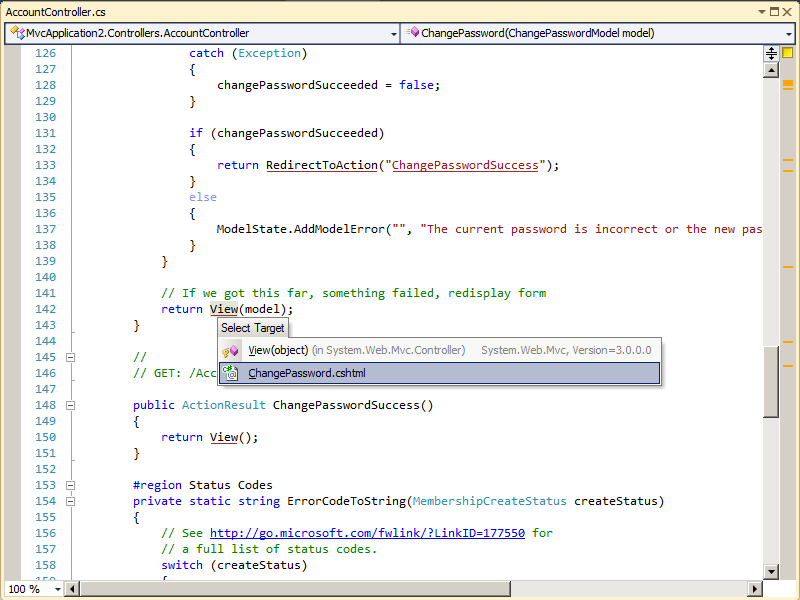
Figure 2: Searching for the view from a Controller using ReSharper 5.1

Here we can resolve the view and navigate to it, which is great, but I'd really like to know the path of the view in some cases.

Now after ReSharper 6.0 is installed (compatible with VS 2010) lets look at some of the above issues we had before.

One thing you will notice when upgrading to ReSharper 6.0 from either 5.0 or 5.1, is you need a new licence key. ReSharper 5.x licence keys do not work for ReSharper 6.0:

Figure 3: ReSharper 6.0 requires a new licence key (I did blank out my 5.1 key, sorry!)


Razor view to controller navigation (RS 6.0)

So now if we open up the LogOn.cshtml file as before and take a look at some of the Razor markup for Controller navigation, we get the following:

Figure 4: New support in Razor for Controller action resolution
So now I have the familiar ReSharper support for just navigating to a method from a calling piece of code. It just so happens here that ReSharper understands the routes setup within an MVC application.

Also notice in this version of ReSharper the familiar "type" box, whether you get this via CTRL + Click or CTRL + T, now shows you the actual project the type lives. This is another powerful feature if the namespaces do not match up to assemblies.

You can get the above menu displayed simply by pressing CTRL + then click the action.

Pressing those key combinations displays a list of methods that match the action name for the controller that generated the view. To navigate to a given action, simply click the desired one in the pop up list, ReSharper will then open that source code and place your cursor at that method.

Notice the above action name is underlined. ReSharper uses this notation to signify that the action or type has been resolved successfuly. This is new when it comes to string types as the action name passed to the Html class is actually a string.

So as before if we now mistype an action that doesn't exist anywhere, ReSharper kindly lets us know there is an issue:

Figure 4: ReSharper 6.0 tells us when the action cannot be resolved!

I really like the above feature. It can save you time. Also notice as the above error gets marked on the right side of the source window above, this is a standard ReSharper feature. Because it's been marked red, it means it's an error.

Although the code will compile and run as before, ReSharper is doing it's best to let you know there is a problem and should be fixed.

Controller to view navigation (RS 6.0)

As we looked earlier, there is a bit of support for Controller to view navigation in ReSharper 5.1, but it gets better in ReSharper 6.0.

So now in version 6.0, placing the mouse cursor over the call to the View method within the controllers (or which ever base controller method is being called) no longer displays the overloads as it did before, instead you get a tool tip that gives you the physical location of the view. In this case we are using Razor so it is the .cshtml file:

Figure 5: In ReSharper 6.0, you can see the physical location of the actual view file from the controllers

I really like the above feature, it just means you have to think less!

There are more features to ReSharper 6.0 but the above ones are the ones I thought were the best, enjoy!

You can download a free 30-day trial of ReSharper 6.0 for Visual Studio 2010 from here: http://www.jetbrains.com/resharper/
 

Thursday, September 22, 2011

Removing the dreaded #regions using Visual Studio

Back when .NET was released in 2001, the #region/#endregion feature seemed like a good idea at the time. I think it was more a novelty than anything.

If you are a seasoned .NET developer you will probably know what #regions are and how annoying they can be (or you might support them, shame). For those who don't know what they are, this MSDN page might help explain #regions a little: http://msdn.microsoft.com/en-us/library/9a1ybwek.aspx

There have been many posts about #regions over the years. There was one I was reading recently that claimed #regions are a sign of code smell! That is pushing it a bit, they are not code smells but are very annoying and if I used #regions it might say something about my code. It might say that I write large bloat god type classes that need regions to split it up in order to maintain it more easily - that you could argue could *potentially* lead to a code smell.

When I open some source code file, often it will not be my code or sometimes it might be. Lets assume its not. Lets also assume that the developer of that source code like regions. The first thing I get is the screen shot below:


Figure 1: God class with regions and outlining feature turned on


So now in order to understand this GodClass, I'm going to have to expand all those regions as I didn't write this code. All I want to do is get at the code to understand it, these #regions are preventing, or rather, making it more difficult for me from doing so.

The title to this post reads "Removing the dreaded #regions using Visual Studio". So if you're in a shop that loves to use #regions or your code base is such that to remove all the #regions would be weeks of work, fear not! I didn't know this feature existed in Visual Studio up until a couple of days ago but you can actually turn off the *outlining feature* that makes #regions possible.

To turn off this feature do the following:

  1. In Visual Studio click Tools -> Options
  2. In the options tree view, click Text Editor -> C# -> Advanced
  3. Then untick option Enter outlining mode when files open (see figure 2 below for an example)
  4. Click OK
  5. Enjoy!

Figure 2: Turning off #region support in Visual Studio

As far as I am aware there doesn't seem to be support for this if you're using VB.NET. This only seems to be a C# feature right now.

So now if I load the GodClass in Visual Studio, I get the following source code:


Figure 3: Outlining turned off

It's not perfect I admit as the regions are still there, but at least I can now see the code without having multiple mouse clicks in doing so...

Windows 8 pre-beta: DRIVER_IRQL_NOT_LESS_OR_EQUAL (storahci.sys)

After the announcement of Windows 8 pre-beta at the Microsoft BUILD conference recently I was dying to install the pre-beta release of Windows 8.

So I downloaded a developer edition from MSDN here: http://msdn.microsoft.com/en-us/windows/apps/br229516

Microsoft offer a couple different pre-built ISO images, 32-bit, 64-bit and 64-bit with a early release of DEV11 and a early cut of Expression Blend 5. Which one did you think I downloaded! ? :)

My client VM tool of choice of late is Oracle VirtualBox. I am currently running 3.2.10 on my production laptop and cannot upgrade for reasons that doing this will break existing VM's that I have.

So disappointingly, when I attempted to install the early cut of Windows 8, I got the error in figure 1 below:


Figure 1: Error when attempting to install pre-beta Windows 8 ISO

Also, it seems the VM also consumes aload of CPU resource when the above error occurs until you kill the VM. See figure 2 below:


Figure 2: CPU consumption after Windows 8 fails to start

After searching the internet for this error, I came across the Windows 8 team blog post that lists the Virtualization technologies that are supported by this drop of Windows 8 here.

I recommend you read the blog post link above before installation of Windows 8 pre-beta.

So the next thing I tried was to run the latest version of VirtualBox which is 4.1.2 on another machine as I couldn't upgrade my production laptop. After doing this and attempting the Windows 8 install again, I got another completely different cryptic error message which haulted the installation.

The next thing to try (which is what I should have done to begin with) was to use one of my physical Windows Server 2008 R2 Hyper V box to host the OS and thankfully, it worked!!

So shortly after I fired up the Windows 8 install wizard I was presented with the licence terms agreement for this early release:


Figure 3: Windows 8 pre-beta licence agreement with dev 11

So far it seems fairly stable, I haven't seen any crashes yet and really just trying it out. I'm not quite brave enough to put it onto my physical main laptop just yet...

Friday, June 03, 2011

CQRS – the future for low-latency systems…

I wrote a post on my other blog here: http://smart421.wordpress.com/2011/06/02/cqrs-the-future-for-low-latency-systems/ that is about pure CQRS.

I have been interested in CQRS for sometime now and I wrote this off the back of a recent CWDNUG session in London a few days ago: http://www.meetup.com/cwdnug/events/18182511/

Friday, May 27, 2011

Next UK ALM User Group Meeting June 8th 2011

Register here: http://uk-alm-june-2011.eventbrite.com/

I always find these meetings really interesting. So you there!Link

Anyone actually using Workflow for builds in Team Build 2010

I have been using TFS 2010 since the early releases and I am very impressed with its features, some of which I have blogged about here: http://www.simonrhart.com/search/label/TFS

But whenever I have tried using the new Team Build 2010 Build Template Workflow (which is based on MSBuild under the covers) I find it more difficult to navigate and manage. Not to mention there are not many activities around for things like, running StyleCop rules, creating IIS virtual directories, managing service accounts etc.

So the real question is, why would I use Workflow over pure MSBuild.

I am very impressed with the MSBuild Extension Pack that contains many tasks that covers the things I mentioned above and more. I also know there is a MSBuild activity which means you can make use of the MSBuild Extension Pack from within Workflow but this kind of defeats the purpose of using Workflow in the first place.

I also often want the ability to run a build locally before check-in. This build is normally a nightly build which not only compiles code, runs unit tests and acceptance tests etc but it sets up the environment. i.e. if you have a BizTalk solution and you need to deploy the bindings, schema's, maps etc the BTDF can be used to help facilitate this easily. Well when I say easily there is a bit of work to get this to work with Team Build that I will blog about soon...

I know in Team Build 2010 there is the new gated-check in feature that shelves changes, runs a build against the shelved changes then merges with the branch in question if successful. This is great but only half the story. On every get-latest I want the developers machine to be setup and be able to run the latest code. If another developer has added a WCF service with a new app pool or added a receive port, this script needs to take care of all that without each developer even thinking about it.

With the Workflow build templates, there is no way to run those builds locally. The gated-check in is an additional feature that addresses the problem of the developer not running a local build otherwise known as a "buddy build" before he/she checks in to prevent build failures.

To date, I use the "Upgrade Template" in Team Build 2010. I was wondering if anyone was actually using the Default Templates based on pure Workflow?

Sunday, May 22, 2011

Microsoft.BizTalk.TestTools.Mapper.TestableMapBase erroring in Team Build

Have you recently attempted to use the Microsoft.BizTalk.TestTools.Mapper.TestableMapBase (This class enables you to test BizTalk maps programmatically through MSTest or NUnit) on the build server as a CI process or otherwise through some sort of test harness, if so, you might have received the following error:

System.IO.FileNotFoundException: Could not load file or assembly 'Microsoft.BizTalk.TOM, Version=3.0.1.0, Culture=neutral, PublicKeyToken=31bf3856ad364e35' or one of its dependencies. The system cannot find the file specified.

This was happening in a new development environment during the execution of MSTest unit tests against BizTalk 2010 Developer Edition and a Team Foundation 2010 build during a CI build process.

After searching around and reading various blog posts, I couldn't find the solution other than to repair BizTalk. This sounded rather drastic to fix a simple error. So I then decided to do the normal thing a .NET developer would do and check the GAC for the file Microsoft.BizTalk.TOM. I failed to find it so I guess the BizTalk installation must have failed somewhere, as I didn't install BizTalk on that machine it's hard to know.

So I then decided to GAC the file. Looking for GACUTIL.exe, I soon realised and remembered that GACUTIL is not supplied with the .NET Framework. As this was a build server, I didn't have Visual Studio installed. Then I remembered I installed the Windows Server SDK v6.1 on this machine so that I could actually build code and run tests (due to various build targets that comes with the Windows Server SDK). When you install the Windows SDK it comes with a CMD.cmd file and GACUTIL.exe (among other things) that sets up the environment ready to use the various tools.

So to fix this missing assembly issue:

1. if you don't have the Windows SDK installed install it (latest version at the time of writing is
v6.1)
2. Once the SDK is installed, run this: C:\Windows\System32\cmd.exe /E:ON /V:ON /T:0E /K "D:\Program Files\Microsoft SDKs\Windows\v6.1\Bin\SetEnv.Cmd" This is assuming you have installed the SDK on a drive D.
3. Run the following command: GACUTIL C:\Program Files (x86)\Common Files\Microsoft BizTalk\Microsoft.BizTalk.TOM.dll -i

Queue a build, or attempt to run the app using the map test class and all should be well (unless you have other issues!)

Administrative access in Team Build 2010 for creating IIS AppPools etc


I have recently been using the MSBuild Extension Pack over on codeplex available here: http://msbuildextensionpack.codeplex.com/. I came across an issue (build failing) recently where I was trying to write DNS entries to the local HOSTS file and also attempting to create IIS Application Pools and users etc using various tasks provided by the MSBuild Extension Pack.

I have separate build servers 1 for CI and 1 for Integration both of which run Team Build 2010 and the build service runs under a domain user account.

Of course attempting to do the above things require local administrative access to the machine on which you attemp to create App Pools, add DNS entries etc. So I fired up Computer Management and added the TFSBUILD service account to the local Administrators group.

After doing this, I queued a build and it still failed. After looking through the logs in more detail and checking Team Build configuration, all looked correct. I then logged onto the machine using the TFSBUILD account and attempted to perform an administrative action like edit the HOSTS file which I was successfully able to do. I also looked in the Event Log for any errors that might give me a clue as to why it was failing, but nothing there.

In the end I restarted the build controller, queued a build and it worked!

So I'm guessing that security permissions are cached in Team Build.

For information purposes, I'm running Team Build on separate Windows Server 2008 R2 machines from the databases and App Tiers. I'm also using the Upgrade Template so using core MSBuild 4.0 - not Workflow to execute the builds.

Sunday, April 10, 2011

At last broadband speeds as promised with Virgin Media and Fibre optic broadband


Norwich broadband speeds over fibre optic cables

I recently changed from old copper cable based broadband provided by Zen Internet to fibre optic provided by Virgin Media, and I must say I am wowed by it's performance. See above. I am paying for 30mbps and I am getting 30mbps!! fancy that, actually getting what you pay for.

For the first time, I can now stream movies from lovefilm directly through my media centre with no stuttering....

Previously I was paying £25 per month for 8mbps over copper lines but actually only getting (if I was lucky) 1 mbps. Now I am paying £21.49 for 6 months then £30.74 and that includes the phone line.

The last time I wrote a blog on this was when I was living in Guildford, South East England, here: http://www.simonrhart.com/2009/03/broadband-speed-test-south-east-england.html

It still amazes me how broadband service company's can charge you a certain fee for a service you have no way of getting. Imagine if this logic was used in all industries, like the motoring industry. You take your car in to have the tyres replaced, but the garage charges you for a full service instead!! madness!

Monday, March 28, 2011

Unnecessary context scrolling in VS 2010 fixed in VS2010 SP1!!

I published a blog post last year regarding the unnecessary context scrolling in Visual Studio 2010 here: http://www.simonrhart.com/2010/04/turning-off-context-menu-scrolling-in.html

This has been fixed in SP1 of VS2010 and can be downloaded here: http://www.microsoft.com/downloads/en/details.aspx?FamilyID=75568aa6-8107-475d-948a-ef22627e57a5

A list of things that has been updated can be found here: http://support.microsoft.com/kb/983509

This particular fix applies to this: https://connect.microsoft.com/VisualStudio/feedback/details/533342


I tested this fix against the VS2010 SP1 beta (above) as it does seem to be fixed, so well done Microsoft!

Management_Install.ps1 cannot be loaded because the execution of scripts is disabled on this system


You might have seen the above when attempting to install the BizTalk ESB Management Portal on a 64-bit operating system.

This particular error has been talked about a lot in the community with the solution but I wanted to detail here in a little bit more detail.

It requires Visual Studio 2010 to compile the code so this is for a development environment:

  1. Start the Windows Powershell command window from the following path: C:\Windows\syswow64\WindowsPowerShell\v1.0\Powershell.exe
  2. Edit the Management_Install.ps1 script and alter the line that sets the VS environment variable to this: $env:VS="${env:ProgramFiles(x86)}\Microsoft Visual Studio 10.0\Common7\IDE"
  3. Run: set-executionpolicy unrestrictedBold
  4. Run the Management_Install.bat from the current powershell command window (don't forget to include current directory i.e. .\Management_Install.bat (notice the .\)
The above should successfully use Visual Studio to build the Management Portal. Of course a better way of doing it would be to use something other than Visual Studio like pure MSBuild.

I need to write something that is suitable for a production environment, so when I do I'll post it here.

Thursday, March 24, 2011

Error: Cannot import wsdl:portType

I recently published a post on fixing an error you might get using the WCF SVCUTIL.exe utility when creating WCF service contracts from WSDL documents here: http://smart421.wordpress.com/2011/03/24/error-cannot-import-wsdlporttype/

Thursday, March 17, 2011

Deploying View... ERROR: The BAM deployment failed. Internal error: The operation terminated unsuccessfully.

I wrote a blog post recently on how to overcome the issue of not having the BAMStarSchema database when attempting to deploy the BAM ESB exceptions definition files as part of a Microsoft BizTalk 2010 ESB Toolkit 2.1 installation. This post can be found here: http://www.simonrhart.com/2011/02/bam-star-schema-database-has-not-been.html

After you get past that and you have a BAMStarSchema database you might then see the following error:

Deploying Activity... Done.
Deploying View... ERROR: The BAM deployment failed.
Internal error: The operation terminated unsuccessfully.
OLE DB error: OLE DB or ODBC error: Cannot open database "BAMStarSchema" request
ed by the login. The login failed.; 42000.
Errors in the high-level relational engine. A connection could not be made to th
e data source with the DataSourceID of 'bam_ExcByApplication', Name of 'bam_ExcB
yApplication'.
Errors in the OLAP storage engine: An error occurred while the dimension, with t
he ID of 'ExcByApplication_ExcDatetime', Name of 'ExcByApplication_ExcDatetime'
was being processed.
Errors in the OLAP storage engine: An error occurred while the 'Month' attribute
of the 'ExcByApplication_ExcDatetime' dimension from the 'BAMAnalysis' database
was being processed.
Server: The operation has been cancelled.
OLE DB error: OLE DB or ODBC error: Cannot open database "BAMStarSchema" request
ed by the login. The login failed.; 42000.
Errors in the high-level relational engine. A connection could not be made to th
e data source with the DataSourceID of 'bam_ExcByApplication', Name of 'bam_ExcB
yApplication'.
Errors in the OLAP storage engine: An error occurred while the dimension, with t
he ID of 'ExcByApplication_Application', Name of 'ExcByApplication_Application'
was being processed.
Errors in the OLAP storage engine: An error occurred while the 'Application' att
ribute of the 'ExcByApplication_Application' dimension from the 'BAMAnalysis' da
tabase was being processed.
OLE DB error: OLE DB or ODBC error: Cannot open database "BAMStarSchema" request
ed by the login. The login failed.; 42000.
Errors in the high-level relational engine. A connection could not be made to th
e data source with the DataSourceID of 'bam_ExcByApplication', Name of 'bam_ExcB
yApplication'.
Errors in the OLAP storage engine: An error occurred while the dimension, with t
he ID of 'ExcByApplication_ExcFaultDescription', Name of 'ExcByApplication_ExcFa
ultDescription' was being processed.
Errors in the OLAP storage engine: An error occurred while the 'FaultDescription
' attribute of the 'ExcByApplication_ExcFaultDescription' dimension from the 'BA
MAnalysis' database was being processed.
OLE DB error: OLE DB or ODBC error: Cannot open database "BAMStarSchema" request
ed by the login. The login failed.; 42000.
Errors in the high-level relational engine. A connection could not be made to th
e data source with the DataSourceID of 'bam_ExcByApplication', Name of 'bam_ExcB
yApplication'.
Errors in the OLAP storage engine: An error occurred while the dimension, with t
he ID of 'ExcByApplication_ExcDatetime', Name of 'ExcByApplication_ExcDatetime'
was being processed.
Errors in the OLAP storage engine: An error occurred while the 'Year' attribute
of the 'ExcByApplication_ExcDatetime' dimension from the 'BAMAnalysis' database
was being processed.
OLE DB error: OLE DB or ODBC error: Cannot open database "BAMStarSchema" request
ed by the login. The login failed.; 42000.
Errors in the high-level relational engine. A connection could not be made to th
e data source with the DataSourceID of 'bam_ExcByApplication', Name of 'bam_ExcB
yApplication'.
Errors in the OLAP storage engine: An error occurred while the dimension, with t
he ID of 'ExcByApplication_ExcDatetime', Name of 'ExcByApplication_ExcDatetime'
was being processed.
Errors in the OLAP storage engine: An error occurred while the 'Day' attribute o
f the 'ExcByApplication_ExcDatetime' dimension from the 'BAMAnalysis' database w
as being processed.

This essentially means that the SQL Server user account is not added to the 'db_datareader' role in order to read the BAMStarSchema database.

Simple soultion to fix this is to add the SQL Server service user to that role for the BAMStarSchema database. I this is a development machine, I am running SQL Server under the NT AUTHORITY\NETWORK SERVICE account, so the SQL to fix this could look like the following:

use BAMStarSchema

EXEC sp_addrolemember 'db_datareader', 'NT AUTHORITY\NETWORK SERVICE'

Of course you could do this via SQL Management Studio if you wanted too.

Happy BizTalking!

Wednesday, March 16, 2011

TFS Workbench: An 'WebException' exception occured during the report list load process

Have you seen the following error recently after loading TFS Workbench:

An 'WebException' exception occured during the report list load process. Error Message: The request failed with HTTP status 401: Unauthorized.

If you don't know what TFS Workbench is, take a look at the above link. It is a great tool for managing work items and running SSRS reports in Team Foundation Server. It works with a range of Team Project process templates, I happen to be using Scrum for Team System for TFS 2010.

If you are getting the above error which is really annoying, you'll see the Report Viewer button at the bottom of TFS Workbench grayed out as per the screen shot below:


The annoying thing about that error is that I get a HTTP TFS challenge when I load TFS Workbench because my client is not running within the same domain as the development environment - which is a fairly common scenario - although not ideal sometimes we have no choice.

When I get this challenge I enter my DOMAIN\username and password, hit return and I am authenticated successfully. I know this because I am able to see my team projects in TFS Workbench. The HTTP 401 error tells me the client is able to resolve the reporting services server as if it wasn't, I would get a HTTP 404 error instead. (I added a CNAME record to the DNS server).

So I *think* what is happening is the code is applying the current credentials for the reporting services authentication web service call but not for the TFS Web Service calls.

Perhaps the code looks something like this:

ReportingServicesClient client = new ReportingServicesClient(); client.Credentials = System.Net.CredentialCache.DefaultCredentials;

Who knows, I don't have the code nor have I decompiled it so I don't know...

The solution is to simply add the name of the machine running reporting services along with the password to the Windows Credential Manager (new feature in Windows 7 and Windows Server 2008).

You can load the Credential Manager from Control Panel:


Then click on the Add Windows Credential hyperlink and enter your details in the dialog that pops up:


When you click OK, reload TFS workbench as the TFS Workbench should now resolve the correct credentials for the reporting services server in the Windows Credential store instead of using the default credentials which should fix this issue.


Saturday, March 05, 2011

The local computer is not a member of a windows failover

Don't make the same mistake as I did recently which was installing the wrong edition of Windows Server 2008 R2 in order to make use of Failover Cluster services.

I installed Standard edition of Windows Server 2008 R2 but in order to make use of the Failover Cluster services and managment snap-in, you need either Windows Server 2008 R2 Datacentre or Windows Server 2008 R2 Enterprise.

Attempting to install SQL Failover Cluster in standard edition will give you the following error message during the validation process: The local computer is not a member of a windows failover

This document describes the whole administration process: http://technet.microsoft.com/en-us/library/cc731844(WS.10).aspx